Scott C. Parker
-
Posts
547 -
Joined
-
Last visited
Content Type
Profiles
Forums
Events
Articles
Marionette
Store
Everything posted by Scott C. Parker
-
You'll need to turn off Summarize for that column. Then, you'll need to use other columns to force sorting in the order you wish to have the info displayed.
-

Braceworks Calculation report PDF low quality
Scott C. Parker replied to Mathijs van Ommen's topic in Braceworks
Can you provide a sample file? My test looks sharp. -
Create steelflex slings from existing slings in the library
Scott C. Parker replied to ldenambride's topic in Entertainment
Hi @Martijn Wingelaar, If you can point us to incorrect symbols and the supporting paperwork from manufacturers, we're all for making needed corrections. These would be counted as bugs and would be added to the list of needed fixes as VW continues to be developed. -
Equipment Summary / Compare to inventory not displaying
Scott C. Parker replied to tspilman's topic in Entertainment
@jkirchhofer Thanks for looking into this. We are working on solutions, but the timeline will likely not make either of us happy in the short term. -
Booms that just work when you make schematics?
Scott C. Parker replied to Tom Lightbody's topic in Entertainment
We are working on improving the schematic view workflow to deal with many of these issues. It's not you, it's us. For now, the best workflow I've seen is seen in @markdd's video on YouTube. Search YouTube for Mark Doubleday Schematic Views and see if his workflow works for you. -
@Sam Joneshas a script that places all symbols in a file into a design layer, along with the symbol name.
-
@Alex Keen You may need to clear your local RM cache file. Refreshing the RM doesn't always do this. Delete the RM Cache folder and then refresh the RM and it'll pull down a complete set of updated RM files. Win: C:\Users\username\AppData\Roaming\Nemetschek\Vectorworks RMCache\rm2024 Mac: /Users/username/Library/Application Support/Vectorworks RMCache/rm2024 Your file location might differ.
-
Cable paths are not obtaining the names of the objects they are snapping to yet. Here's what I do: Set the auto numbering to match what you're snapping to before placing the paths. For example, if I'm snapping to my truss runs 1-6, I'll set auto number with a prefix of Truss- with the first number matching the first/next truss to be snapped and set the suffix to -Path. Then place paths in the order matching the truss clicks. This results in: Truss-1-Path Truss-2-Path Truss-3-Path You can also use the spotlight numbering tool to number after the fact.
-
This was fixed in Update 4. What build are you working with?
-
PS, here's the file back with my changes.Default Classes.vwx
-
Have you played with the custom class settings in the spotlight preferences dialog? You can choose any field shown in the OIP for a light for the unit class. Here's a video with two methods for changing class names for symbols, which will help you build a custom library with the needed classes. It might be easiest to use the instrument type for the classes which removes the need to do the custom record editing I show. LightingUnitClasses.mp4
-
Data Viz in the Equipment Summary Key
Scott C. Parker replied to Scott C. Parker's topic in Entertainment
Hi Tom, I confess, I don't use the Graphic legends, so I don't know. -
@LeeElston I don't know why placing the data tag as an annotation in a viewport strips it of its color. I've asked the tech support team and await a reply. However, if you place the data tags in your design layer, the colors show in the viewport.
-
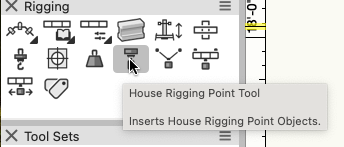
Have you tried the House Rigging Point tool?
-
If you could share a file, it would be helpful for troubleshooting.
-
Worksheet formula for equipment counts
Scott C. Parker replied to NickSolyom's topic in Entertainment
Exporting into Excel is a good way to go if you like excel. -
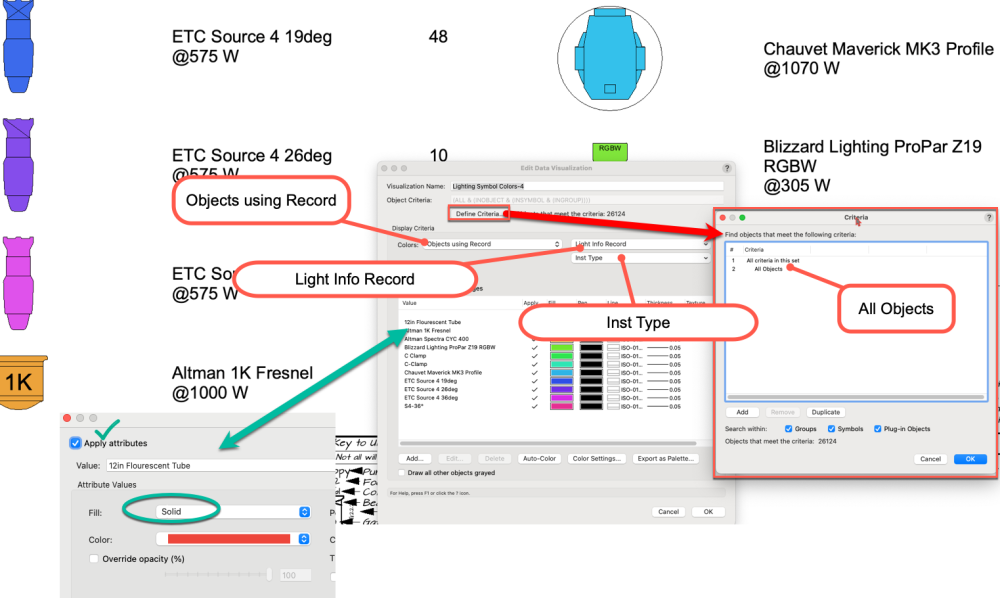
Now that update 4 is out, here are the settings to set up data viz for your lighting units.
-
@JustinVH I think this is the one you're thinking of.
-
Report/worksheet of cable ends/lengths/type
Scott C. Parker replied to ldeikis's topic in Entertainment
@ldeikis Data cables? Are you trying to connect two cables to devices, power and data? When the cable tools were rebuilt to support 3D and Braceworks calculations and add power calculations, Vectorworks's first round dealt with power. Sadly, data was left for the future. The cables enter connection info for power circuit connections but not the data cable connections into the OIP of devices with both fields. You have the option to restore the old version via the Workspace Editor. They're listed in the folder tree shown in this screenshot. If I were still doing shows and didn't need the 3D/power functions offered by our current tools, I would use the expanded functionality of @Sam Jones's version of the old cable tools offered in Autoplot. As the current Spotlight Product Planner here at VW HQ, I can say the cable tools are in active development to bring back all the power of the old tools and then some. I've been a thorn in some sides about this. 😇 Sam's reports are amazing. If I do not understand the issue and it's not about data being separate, please share a file so we can take a look.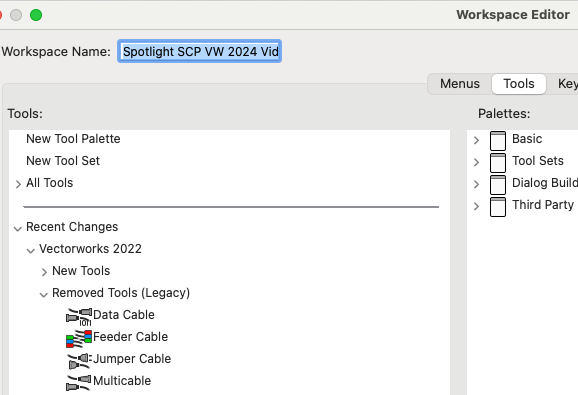
-
Report/worksheet of cable ends/lengths/type
Scott C. Parker replied to ldeikis's topic in Entertainment
The new tools lack some of the old reporting abilities. We're working on it. Here's a file with worksheets I use while testing internal cable tool files. Let me know how they work for you and what other info is needed. Yes, I know we need more and I have a list. Always looking for input. Thanks, ScottCableDistroWorksheetsSCP.vwx -
I'm doing some research, but it's unlikely going to be something we can do at the moment. The issue is that the speaker tool places a parametric object that represents the speaker symbol. The cable tool doesn't look inside parametric objects yet. I started going down a rabbit hole of grouping a speaker version of your symbol with a distributor version, and then making a grouped symbol. This had some success but became wonky if I tried to move things around. Cable tool improvements are actively being worked on and making connections to plug-in objects is a high priority. I'll keep you posted.
-
You can edit the symbol and it should update all the copies. You might need to exchange them though. It's the same process as I showed in the video when I edited the top bar.
-
We likely want a copy of this file. Having files we know will crash when repeating the same steps is gold for the programmers. Can you share?
-
Truss unit substitute within the structure
Scott C. Parker replied to TomLav's topic in Entertainment
Can you share a file? -
Hi Ryan, You've found a bug. The file looks like it was originally from an older version of VW. I'm not sure if that's the issue. But it should still work, no doubt. I tend to use an actual symbol instead of the label legend, which is currently working. Here's a video. Best, Scott TypSymbol.mp4