



Markvl
-
Posts
875 -
Joined
-
Last visited
1 Follower

Recent Profile Visitors
4,269 profile views




-
@cberg Exactly. I had know Idea those were there. So I set each wall in the plan by style and voila it fixed the issue. Thanks
-
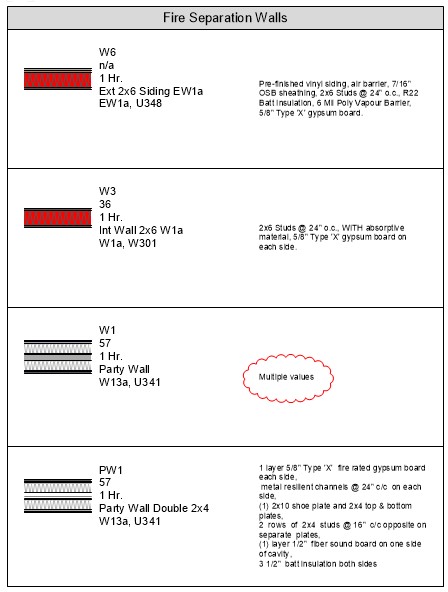
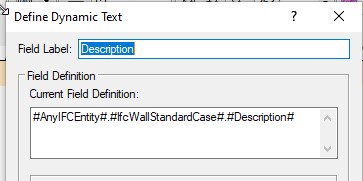
I'm loving the new Graphics Legend but I've run into a couple of snags. One...there seems to be no preset function to pick up data imputed into the Description box for walls. Two...I did manage to fudge a string together to pick up that same data but now I have a wall that is reporting "multiple values". I've tried rebuilding the wall with the same data but with no success. Is this a bug? It's acting like it. Any help out there VW?
-
Thanks so much @Pat Stanford Found a few more functions to play with. That did the trick. This new tool is just fantastic and is going to save us at our office a lot of time.
-
I've been playing with the new graphics legend in vw2023 but I'm wondering if you can display the Style Name/Symbol Name of the Object you're displaying such as a door. I may have a door style called "Door Int 32in Closets" Can we make that show up in the Cell for each door, window, etc?
-
Try using the Roof Face Command under the AEC Menu. I make my roofs with the Roof Face Command. I like to first draw my roof plan in 2D and then make all my polygons for the command and then systematically make each roof face.
-
 Yes please. I hear ya.
 -
I have an M4000 in my workstation. I've been happy with it. Just updated drivers for it this morning. Seems to be doing well in VW2022 too.
- 1 reply
-
- 1
-

-
Well I'm not the only one who thinks Windoor is not intuitive. I want to like it but man some of it takes time to get my head around.
-
Problem with Window Trim using Jamb Extension
Markvl replied to Markvl's topic in General Discussion
@Wes Gardner I know things can take time but this is still a problem in VW2022. Should be an easy fix for the code writers. -
Found it. Had to import it.
-
Would there be a reason why I don't see Redshift as a style option when I go to update a viewport?
-
I'm excited to have Windoor as it does so much more but boy it's a little harder to get my head around some of the details. Not too intuitive I find.
-
So Yay. Its available to Designer licenses. Now I need an instruction manual.
-
So windoor is not included with VW2022. Is this a plug-in that we can now purchase? I was hoping for windoor to be built in. Sadly not so.
-
Wishlist - Wall with multiple wall styles
Markvl replied to Gregovitch's question in Wishlist - Feature and Content Requests
Agreed. I often have situations where I wish I just had an exterior finish to finish off a small area created by a roof without using an entire wall style where a wall peak function will not work well.