



dtheory
-
Posts
171 -
Joined
-
Last visited
Recent Profile Visitors
3,817 profile views




-
FYI, I've had the same experience, certain surfaces that should render as white, render as black.. I'll let the forum know if I come up with a solution or contact support.
-
Ando style concrete formwork hatch (metric and imperial)
dtheory replied to mike m oz's topic in Resource Share - Hatches
bump -
@Tom W. is correct... Vectorworks MUST be closed in order to run the repair function.
-
Just FYI, the update installer is a separate program in the same folder as VW. That app "Vectorworks 2024 Updater" also has a repair function which you could try running before updating. The repair function is under "advanced options".
-
Selling Vectorworks Architect 2024 licence
dtheory replied to VandurenR's topic in Buying and Selling Vectorworks Licenses
curious.. are you moving to a different CAD/BIM package? -
legends best practice - graphic legends or worksheets?
dtheory replied to JAMZ21's topic in General Discussion
I recently used graphic legends developing a kitchen project... worked very well for what I was looking for, the layout took a bit of fiddling and it's hard to eliminate unnecessary white space as seen below the vertical size of each cell is keyed to the cabinet that's' tallest... and the layout for the others isn't ideal. Does anyone know a workaround? But I'm really liking the convenience..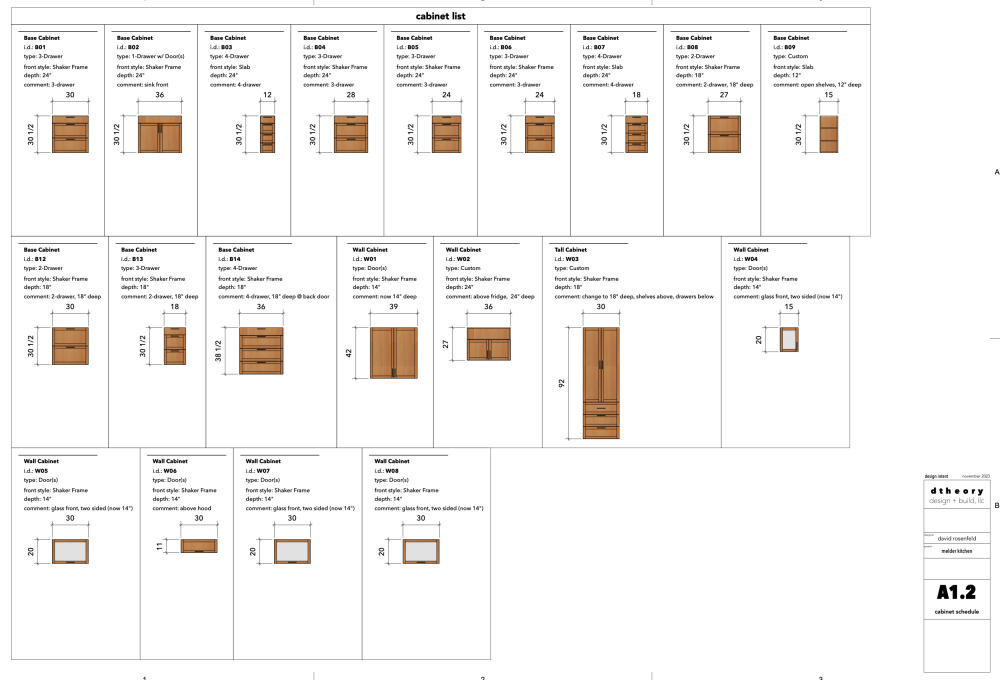
-
Thanks for the feedback, I was a user of C4D in the past, and yes, it's really not justifiable for what I'm doing now. I'm currently exploring TwinMotion.
-
Pardon me if this has been covered.. seems like the subject is in flux. Anyone want to chime in with recommendations for a supplemental renderer for VW Designer.. anything from free on upward.. I'm a solo operation, so probably biased toward low cost and speedy renders.. (pick two.. cheap good or fast!). Thanks all..
-
I'm familiar with Interiorcad.. I've been an owner, but can't really justify the purchase since they've raised prices.. I do design build, and cabinets are a part of what I do, but not the main thing, hence the need for estimating..
-
Thanks for the input and sample files, some good stuff to try, though, by way of a comment, seems like area of doors and drawer fronts, in categories by material would be a good ones to be available in the basic built-in criteria..
-
Hi All, Is anyone aware of a worksheet criteria that would allow the extraction of square footage (or square inches, whatever) of cabinet doors and/or drawer fronts? I can ballpark this with cabinet width and height, however, on this project, I have a significant number of "two sided" cabinets, and it would be convenient to extract the square footage of those parts for estimating purposes, also possibly extract numbers for different door materials such as solid slab, shaker, or glassfront.. Thanks!
-
M1 Mac Studio. Not run into any major issues, there have been a couple of graphic glitches that resolve by restarting VW.
-
Mac Studio M1 Ultra 64Gb RAM 6:45.. substantial difference from @Don Seidel An earlier test performed on VW2023 came in at 6:33
-
this is a good one.. should be very useful
-
been waiting for something like this for quite a while.. I design cabinets, but not often enough to justify the expense of Interiorcad.

