



MrTemplate
-
Posts
396 -
Joined
Recent Profile Visitors
3,488 profile views





-
send me the file and i'll take a look? shelley@fieldtemplate.com
-
Hi Iainy1961; it looks like you are working with different symbols in different files? i would suggest you edit the 2D component of the Ayrton resource, and check that the "focus range" circle is either not filled, [or if you want it to obscure anything underneath, move the circle shape to the bottom of the 2D resource.] once you insert another Ayrton resource, it *should* appear correctly? best, steve
-
ColorForce II 72 - No Asymmetric Beam Angle
MrTemplate replied to philgilbert's topic in Entertainment
Kevin, is there a webinar or something that explains your statement above? how do i "apply a custom IES file to the light, orient the IES, and render in renderworks"? thanks in advance, Steve -
To my knowledge, this is the way it has been for some versions of the app. it may be that this label legend was so old that it needed to have the containers reassigned? as for adding a line to connect all the containers to the instrument: it's been a while, and might require experimentation?
-
I just downloaded the "example.vwx" file. opened it, opened Label Legend Manager, and then Edit th fields. it appears that you weren't able to click on each of your attributes and then select the container type that you wanted. in the screen shot, i selected each of your desired attribles, then clicked on the container type and selected the circle, rectangle, and hexagon, for the channel, universe, and circuit number, respectively. seems like you're almost there; just select the attribute, then click on the container type that you want.
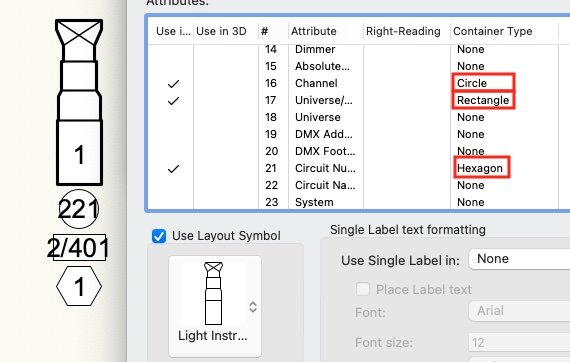
-
scott, when you say "plug-in version of the symbol," are you referring to a lighting device that's the result of insertion using the spotlight lighting device tool, rather than the hybrid symbol created with the symbol insertion tool? and, if not, what is the "plug-in version of the symbol"?
-
Hi Justin; thanks for the link. sadly, it brought up many more questions than answers on my part. are there any other videos regarding spotlight symbol construction? maybe they'll answer my numerous questions?
-
Hi Justin; Could you provide a link or two to the videos you speak of? i just tried [yet again] to plow through the Vectorworks University web site [https://university.vectorworks.net/]. and i find it pretty confusing. Presumably the "Industry" is Entertainment, but the videos you refer to - are they part of "skills", "webinars", "workflows", "classes", or what? i'd be thrilled to take a look, i'll wager many of my techniques are way out of date? Let me know specific links or courses i could review? thanks in advance, Steve
-
Hi folks; I can take no credit for these symbols. I don't believe i've seen them before. that said, any text included in any of my symbols have no "fill," so the text doesn't obscure the symbol outline, like these two samples.
-
I cannot take credit for these symbols. that said, i think the line weight needs help and there are too many details. so what do i know.
-
Using "Base Plates" with papes and truss's
MrTemplate replied to Cristiano Alves's topic in Entertainment
Thanks, Mark. Sounds like this could easily be the next webinar! -
Using "Base Plates" with papes and truss's
MrTemplate replied to Cristiano Alves's topic in Entertainment
Hi Mark; i just reread your note, and i remember your excellent webinar. but i don't remember how you attached all your rigging hardware apart from clamps as "point loads." what is a point load? how do i select a piece of rigging hardware and assign it to a "point load" category? thanks in advance, Steve -
ETC S4 Lustre series 3 symbols are not the right size or shape
MrTemplate replied to DCLD's topic in Entertainment
I certainly feel your frustration, but regardless of your emotional state, YES! Don't merely start a list of the unsatisfactory issues, submit them! every one of them! and make each issue separate, so that it can acquire it's own votes or responses. As applications develop and get larger and acquire more tools, there are potentially more trap doors. and like every project overseen by management that doesn't really know how the product is used, or has the intuitive understanding of an end user, the *only* way that an issue gains traction is to be listed in this forum AND in Jira, get responses or reinforcement, and then gains enough support to get fixed. -
ETC S4 Lustre series 3 symbols are not the right size or shape
MrTemplate replied to DCLD's topic in Entertainment
Hi DCLD: I cannot speak for the Nemetschek Lustr series 3 symbols, but after reviewing my notes, i can make a couple of observations: 1) years ago when i started making SoftSymbols, I decided to create both 2D and 3D components that reflected the true overall size of each lighting fixture. that said, i also decided to make each symbol with the lens barrel retracted to as *small* an overall length as possible. my thought was: "drawing a symbol as frontlight, even if the barrel is all the way out, it will still be on a sectional diagonal, and the front of the lens will not stick out much further than as drawn. drawing a symbol as sidelight, even if the barrel is all the way out, it will still be on a 3D front view diagonal; same thing. if you draw the 2D with barrel extended, you run the risk of reducing the amount of available room to fit in all the light devices without overlapping between symbols and potentially obscuring information either the lens or in the butt of the unit." in my ETC S3-LED Lustr symbols [for example,] the 2D and 3D components are drawn with the barrel "retracted." 2) The overall length of each fixture in the Lustr S3 series varies by beam spread. while i try to make all the symbols accurate size, there's also the question of being able to recognize similar unit type, and sometimes that unit type is overall length. in fact, the only two fixtures that are matching overall sizes to one another is the 26° and the 36°, and the 50° and the 70°. worst case, i also include a second set of symbols that contain a beam spread number in the nose [instead of a slash or line] to help identify the beam spread. 3) There are a jillion symbols for a lot of lighting manufacturers. If there's a symbol that you *must* have, please remember that the amount of hands available for this kind of request is very finite. rather than wait for someone to update the symbols of your choice it'll be quicker to edit and alter the symbol's size to your satisfaction on your own. just my $.02. Good luck! -
can you be more precise? like a specific fixture or range? strand was a prety prolific manufacturer.
