


Clint Alderman
-
Posts
71 -
Joined
-
Last visited
Content Type
Profiles
Forums
Events
Articles
Marionette
Store
Posts posted by Clint Alderman
-
-
Having trouble creating and editing Textures in VW 2023 SP 2 build 679347.
Working on an imported 2022 file into 2023. I am unable to edit Textures from Resource Manager. When I right click and select a Edit, the dialog box does not appear.
I can duplicate a Texture but not edit.
I can not create a new Texture.
Closed VW and restart.
Create a new blank drawing.
I can not create a new Texture in Renderworks.
In RM1. Right click
2. New Resource
3. select Renderworks Texture
4. No dialog box opens.
I can create other resources. If I create a Material, I can add a stock Texture. But can not edit the Texture in the Resource Manager.
-
-
Hey Mick, good to know. And appreciate herbieherb's explanation.
As usual, this forum is a great resource! Thanks.
Looks like Samsung 980 Pro (planned for Q2-Q3) is nearing release with brief lising:
https://www.anandtech.com/show/16052/samsung-980-pro-briefly-listed-online
Nice speed bump.
-
12 hours ago, mick_ch said:
Main storage : Samsung 970 EVO Plus 500GB, M.2
Mick,
Consider the Samsung 970 Pro series rather than the EVO Plus.
A few years ago upgraded a stock 7200RPM SATA Internal 3.5" HD with a Samsung 860 Pro Series 2.5" 256GB SATA (SSD).
Wow, big difference. But it filled up quick.
So, replaced the 860 Pro with a Samsung 860 EVO Series 2.5" 1TB SATA SSD to save a few dollars.
I knew the Pro was faster on paper, but I didn't think I'd noticed a performance difference between the Pro and EVO.
Wrong. The Pro was snappier.
-
Awesome Materials feature!
I came to VW 2010 from Sketchup and AutoCad.
At the time, I found VW's process of setting up 2D (fills and textures) and 3D (renderworks textures) really convoluted and unproductive.
I wondered why can't "textures" be defined in one dialog box and it render in 2D and 3D? (like sketchup...)
Finally with a lot of experimentation, I learned how to get the results I wanted.
Though powerful, the current VW 2020 and prior process is not straight-forward.
Very glad to see VW developing materials in this way.
Thanks!
-
 1
1
-
-
Good job VW Team!
-
2
-
-
Who's in favor of adding Teaser Thursdays?
We're eager for more!
-
1
-
-
Looking forward to seeing the recommended hardware specifications for VW2021, along with an updated explanation for what component features will take advantage of this release.
-
2
-
-
Thanks for the comment Peter.
Yes CorelDRAW is still kicking with new owner.
I have Illustrator and Affinity.
Not to start a “war” 😀 but CDW has stock features which Illustrator or Designer lack for signage design. Will use only CDW on small projects when VW is not needed. And almost always use CDW for message layouts.
VW is used for most signage projects and is much better in many ways than CDW. The one exception is VW is limited for handling typography due to no support for advanced OpenType features. So there’s a need an illustration app for message layouts, make PDF and import to VW. So Affinity would be a second choice app choice if CDW didn’t perform well on Mac.
-
With the updated iMac, I’m doing my yearly Mac drooling and wondering if this is the year I jump fence to become a Mac Dude?! Been using PC/Windows since about 1988. Until the last few years PCs were the only option with my workflow apps.
Now it’s time for a new system and all of my workflow apps run on MacOS. The cost:quality for high performance is about a wash and often in Macs favor. So I’m doing some serious fence sitting.
The only application I have question about running on Mac is CorelDRAW.
Any Mac users on the forum using CorelDRAW?
Any PC and Mac users have experience using it on both platforms?
-
On 12/12/2019 at 9:40 AM, Tanner Shelton said:
I remember watching the 2020 promo videos and thinking, "Oh wow! 2020's UI looks awesome" Then getting 2020 and realizing mine didn't look anything like that.
Yes! 1000x Yes!
Hire who ever is doing the icon design for the promo videos. It's already done. Just use it.
-
3
-
-
On 5/29/2020 at 3:57 PM, Xland said:
I was exceptionally slow to load 2020 this year but I was disappointed to see that the desktop icons changed to double line images. They are too small to warrant pale blue shaded double line graphics- please go back to the simple, single line icons we have been using for the past 10 years. Vectorworks is an amazing product that puts out some great graphics but this is not the place to get cute.
Agree. I hope VW listened.
All, please click the up vote arrow.
As MartinFahrer aptly said: "it feels like I'm working on a kids program."
-
On 9/16/2019 at 9:28 AM, Tom Klaber said:
7) New GUI - let's be honest - the new icons are not great and seemed rushed just to allow dark mode. I would be fine with the GUI you show in the promo videos. Just implement that. You have already designed it! The icons are cleaner - the dialogs are cleaner - nothing fancy - it just feels on-purpose.
I hope a professional icon theme is on the list.
The 2020 theme was a huge dud. Sorry to say. Really am.
Every time I open VW2020, I sigh.
With a new release in a couple of months, I'm really looking forward to seeing an icon theme worthy of the application.
-
3
-
-
Thanks rDesign for finding the script!
And kudos to who wrote it. You guys are too smart. 😀
That script sounds like what I had in mind.
Someday... I'll have to learn how to use scripts.
Hopefully VW will add that script to the application as part of their commitment to improve usability.
-
- Popular Post
VP Names can be manually changed. This is good because the auto naming convention is not ideal.
Looking for better auto usability.
Currently Viewport auto naming is: VP#/Sheet Number
Example:
1/A-201
1/A-301
2/A-201
2/A-301
3/A-201
3/A-301
4/A-201
4/A-301
When there are numerous VPs, it would be much more helpful if VPs were: Sheet Number/VP#
Example:
A-201/1
A-201/2
A-201/3
A-301/1
A-301/2
A-301/3
A-401/1
A-401/2
A-401/3
Another request: automatically update the VP Name (sheet number/vp#) when the VP is moved to another sheet.
When a VP is being moved to another sheet, there is already a warning message of a number duplication conflict.
Linked drawing labels are automatically changed. So why not automatically change the VP Name using the current Sheet Number?Regardless of the above naming convention, the VP Navigation palette should have the ability to sort by Sheet Number.
-
5
-
The default symbols have been poorly configured from the start. There needs be be better control using the object info palette.
These need more attention.By default, the top text object should be closer to the horizontal bar, and set to center, bottom aligned.
By default, the bottom text object should be closer to the horizontal bar, and set to center, top aligned.
I've found that Sketchup has better out of the box symbols than Vectorworks. That should be.
-
Hi. I learned AC first. An issue that was very perplexing and remains a challenge is the difference in how object properties in an AC “block” and a VW “symbol” behave.
In AC blocks, objects are often drawn on layer “0 ”which is similar to VW None class. (Note: AC “layer” equals a VW “class”). When an AC block with objects on “0” is placed in the DWG file, the block objects inherit the line weight the AC layer (= VW class). Layer 0 is typically a very thick black/white line. Used correctly this is a great feature I wish was possible in VW.
When you import AC blocks into VW as symbols, those lines in the new VW symbol can be the problem. You can either edit the symbol and redefine the line thicknesses or if you’re lucky, you can redefine the class 0 to a thinner weight for all class 0 objects. The later rarely works and you’re in for grunt work to get things to look right. If the DWG file was exported from Revit then there are other issues as rotated DWG blocks get imported as multiple symbols in VW for what is really the same object. Much more grunt work!
If you have AC or Briscad or even LibreCad, you can edit the blocks before importing into VW to move block objects to a different AC layer.
Later I’ll post a Revit export to DWG options settings that works well. i give it to clients using Revit. The export settings create DWG files which when imported into VW look and print exactly like Revit. Huge, HUGE time saver!
-
DBruhnke, I thought about that. And that would work.
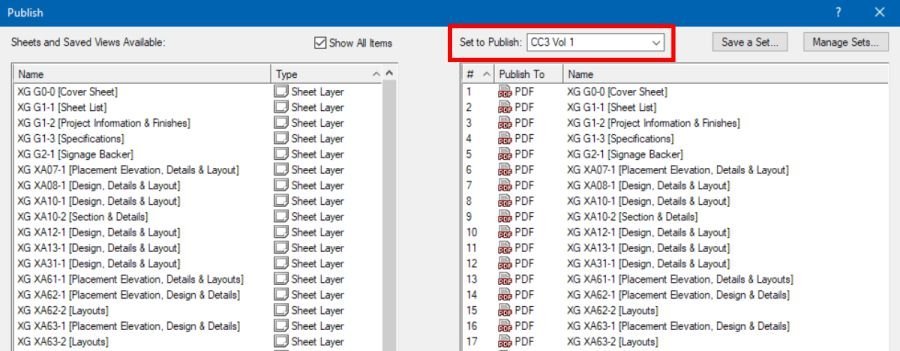
What I decided to do was to select one sheet at a time and add to the print list, then saved as a Set to Publish list. That way if I need to reprint, which of course I did, then just need to select the list.
Appreciate your idea.
-
1
-
-
Ditto. Hope it's fixed yesterday. I need to issue a package hours ago!
Work around anyone? 🤢
-
Microsoft has greatly improved automatic scaling for High DPI screens. My 2016 MS Surface Book has a 3000x2000 resolution 13" screen. The recommended Settings/Display is 200% For 99% of applications it automatically works just fine, and VW has always looked surprisingly "normal". For a few applications, a tweak is needed.
I was concerned a 13" screen would be too small, especially for VW. So, I tested a screenshot pic of VW at a local store. Everything seemed readable. The clarity of MS PixelSense makes up for the screen size. I have not had a problem reading items any more than my 1200 x 1920 , 24" monitor. Though very readable, I would still rather have the new 15" Surface. VW "snap loupe" using the Z key is especially great for small screens. And, I do make use of tool palette auto-hide so the drawing area is as large as possible.Based on this, I suspect a 4K display would render VW just fine, and it would be good for other apps. But, I would want to experiment seeing a screenshot. Not concerned about newer GTX cards running 1 or 2 4K monitors.
-
Mike, thank you the info!
Just still not clear on how the GPU and CPU are working together in rendering.
Does Renderworks offloads processing to the GPU?
The i7 9700K does not have hyperthread. The i9 9900k does and with a price bump.
If the GPU, say a GTX 2080Ti, will now take some of the render load, will the i9's hyperthread be needed?
-
I would prefer to have separate buttons for Move and Copy.
-
 1
1
-
-
On 9/12/2018 at 4:43 PM, PVA - Jim said:
Its totally dependent on how well everything goes with 4, we will be keeping an eye on the metrics that come in and if its nice and stable, we will be able to raise it sooner. If we have stability issues, we wouldn't want to raise the number until they were resolved. Apparently it isn't a matter of a heavy workload to bring more cores into use, just cautiously introducing the new tech.Hi VW Tech/Engineers.
We really do need someone to fill the huge void left with Jim's absence.
The CPU and GPU venders keep pumping out devices, and it's not clear if VW makes use of the new tech. And if so, in what way?
For example, hyperthreading. For years, I've been using a 6-core Xeon processor with hyperthreading. It looks like VW is using all 6, plus the logical 6 during renders. So, is Jim's comment about a 4-core limit still accurate? By my experience, it was never accurate. But who am I to really know?
Considering a new PC with either a i7 9700K or i9 9900k. Would VW make use of the i9 hyperthread?
What would be truly helpful in the System Resources is a list of the vendor technologies and whether or not VW uses them. Another example, one of Jim's emails mentioned that VW does not use SLI (not sure what that is, but it's suppose to be great) and other technologies. Still true. What else?
Rather than have us search the forum for hardware info, which for the most part is user experiences, start a list and keep it current.
Telling us to get a gaming rig is not very helpful. And gaming rigs are just plain ugly and unprofessional looking. Yes, that matters.
We need better guidance. And, really, do we have to ask?Please, pretty please. Would you tell us what you know?
What systems are VW staff using?
What are their experiences?
Thanks,
-
4
-
-
Thanks Grant. Good info!
Version 2023 Texture Creation And Edit Broken
in Troubleshooting
Posted
Hi. I called Tech Support. Renderworks is not loading on desktop but is on laptop. Will be replacing desktop later this week anyway. So I’ll revisit again if an issue.
BTW it’s a PC. I did a repair. An issue was found and fixed. But didn’t fix after all. Did a clean install. Same problem. Who knows. Doubt it will be a problem in few days.