



domer1322
-
Posts
584 -
Joined
-
Last visited
Content Type
Profiles
Forums
Events
Articles
Marionette
Store
Posts posted by domer1322
-
-
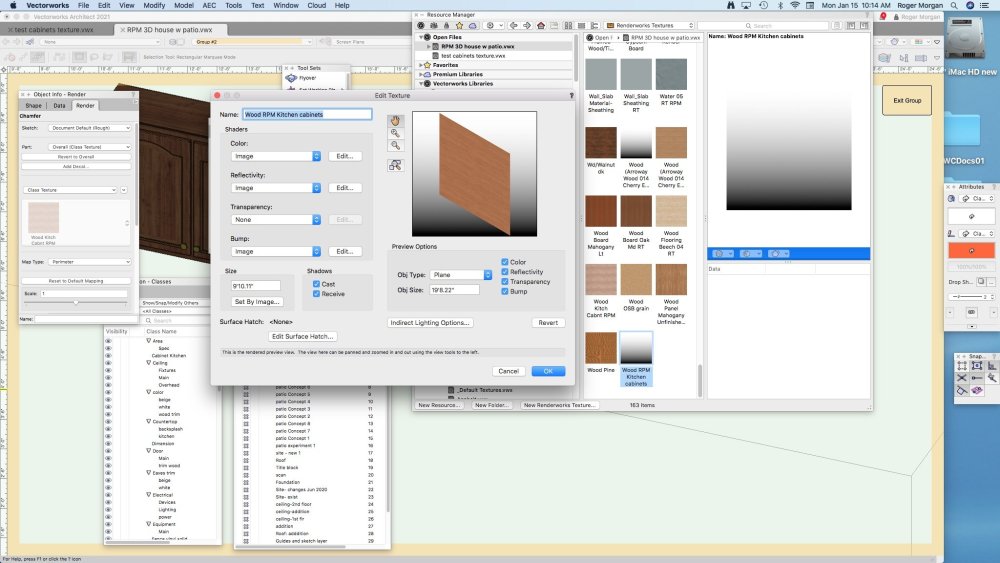
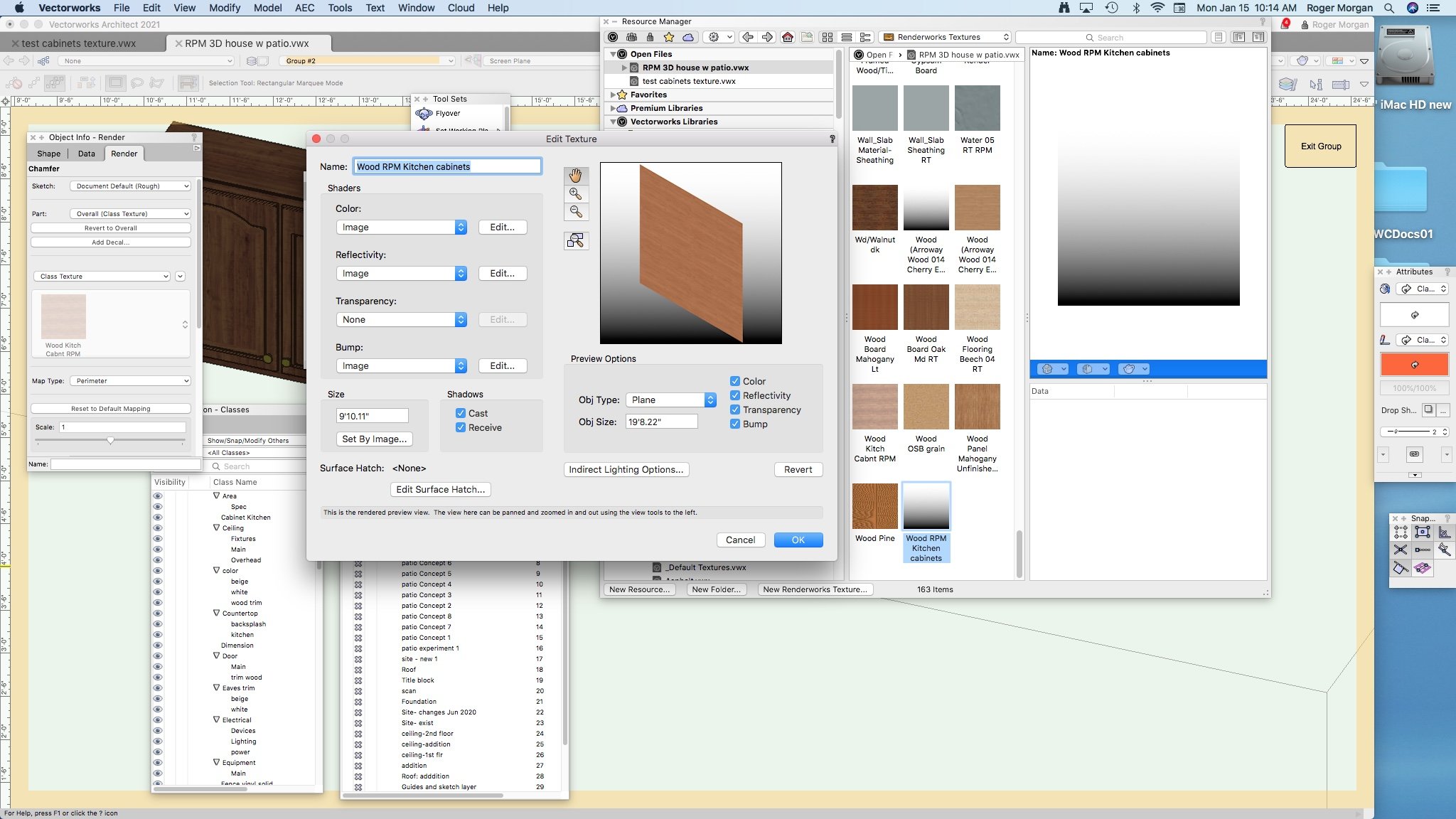
Can you tell me how to fix this .... it often happens when I edit a texture or make a new one, that the preview window in the Resource Manger does not display the texture, but instead it shows a gray gradient. Look at this screenshot, and you'll see the texture "Wood RPM Kitchen cabinets" has a colored texture but it shows as a gradient in the Resource Manager. You can also see another "Arroway" texture has the same issue. How do I fix this ?
Thanks (in advance for the help).
-
well ..... this terminology change gets my attention When I bought my perpetual license one year ago, I also bought service select which will expire in a couple weeks. I was very careful to get confirmation via email and verbally from the sales staff that my license would allow me to get VW2024 before my service select expired. They said that I would be entitled to get service packs as they were issued for VW2024 during the following year before VW2025 comes out. I would not be entitled to 'Updates' since last year the term 'Update' meant a new version ... that is ... version VW2025. Now this thread tells me that they define an 'Update' as the same as a service pack. Thus, I might not be entitled to service packs this year because they are now called an 'Update'. I'm hoping someone can tell me that I will still be able to update my VW2024 with all service packs that occur before VW2025 is published, even though my service select expires in December 2023.
-
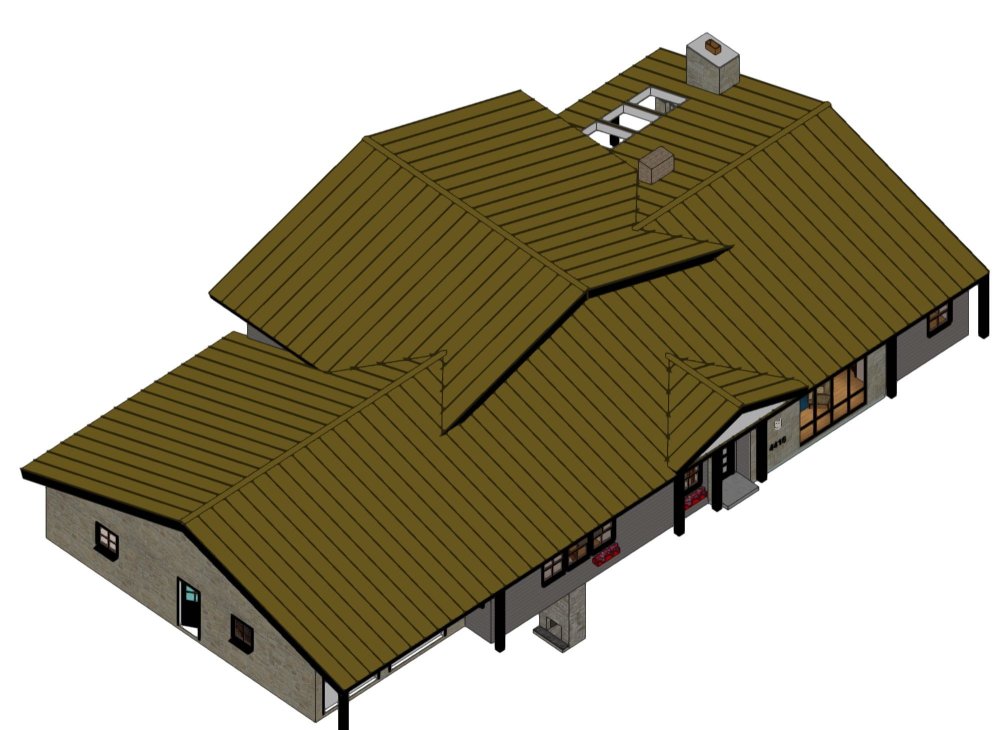
Is it possible to use the VW roof tool to make the roof shown on this attachment ? Here's the catch ... I know I can make this out of two separate roofs, but I want one that will be the same roof object so I can send it to the framing tool and show all the rafters/ridges/valleys. I'm not concerned about the skylights or the dormer by the front door. I'm asking the forum experts if the roof tool can model the two perpendicular roofs as one piece, as well as .... can the roof tool model the location where the higher roof overhangs the lower roof. I'm likely going to do this piece-meal but I seek any tips or advice on using the roof tool for this.
-
I can tell you that I ran VW 2015 on my 27" iMac late 2012 intel core i7 on High Sierra and I did not notice any problems. I am aware of the VW compatibility chart that says it isn't possible ... but it is. I am now running VW 2021 on the same machine and OS without issues. That machine and OS will not run VW 2022.
-
 1
1
-
-
thanks .... when I import them, they all seem to be at the wrong scale. I have to change the scale to about x12 times. Is there a way to change all the texture scales at once ?
-
thanks for the replies. I tried to edit some of the symbols, and found that about 25% of my attempts to edit them did result in 'waking up' the symbols. Puzzling indeed. I have VW 2023 loaded on a different M1 Mac Airbook, and I tried the same symbol download and it worked perfectly. I exported the file into VW2021 and the symbols stayed perfect. So ... I guess i have a work-around until I buy a new desktop with a new Mac OS. Pat: thanks for confirming my suspicion that there is some incompatibility. That will save me a lot of time trying to fix this. However ... just to defend myself .... notice this attached compatibility chart says VW 2021 is compatible with Mac OS 10.13
-
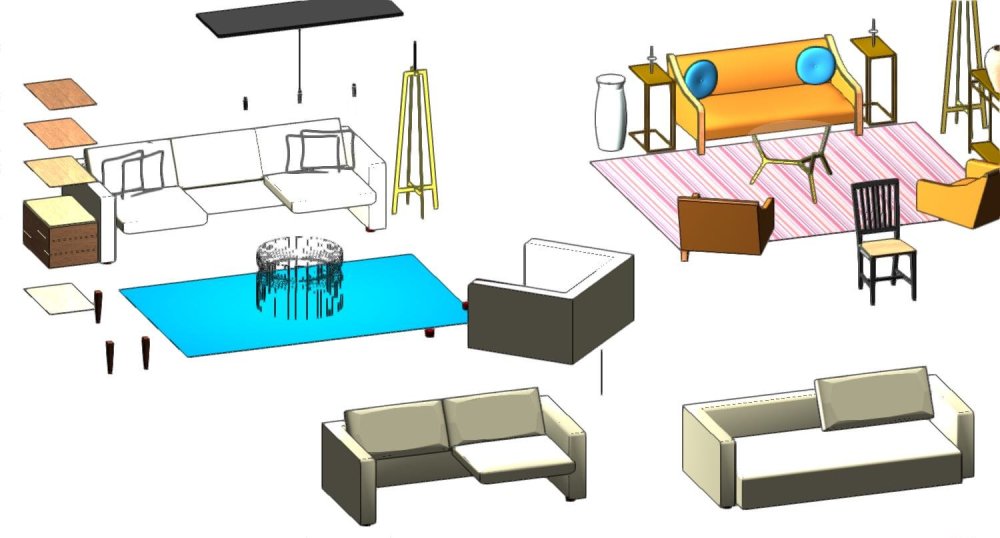
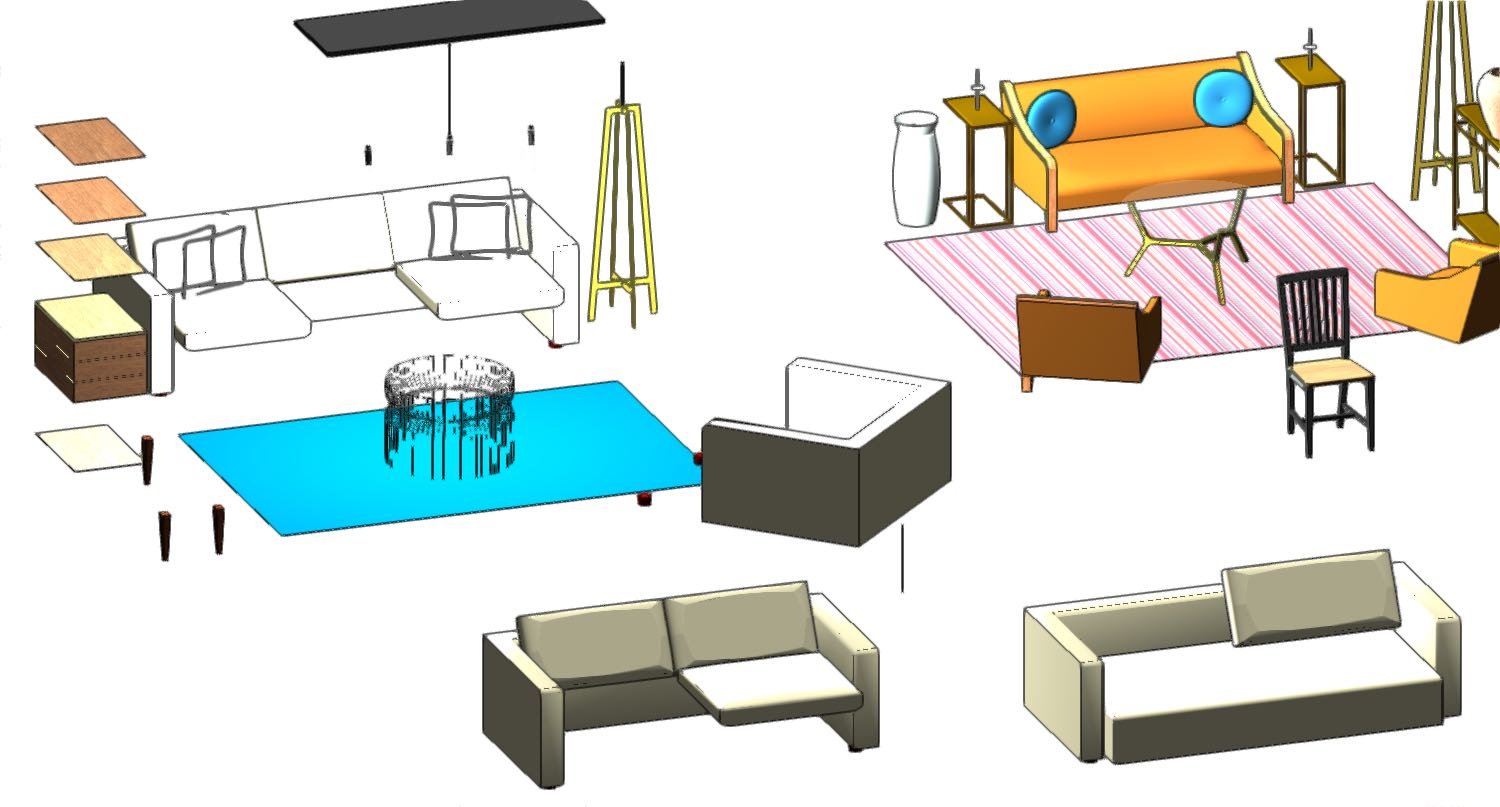
need help .... I'm noticing that my imports of symbols are frequently faulty. The symbols often import such that pieces of the symbol are not visible. The geometry exists, but it is as if the solid fill is 'none'. I've tried to figure out how to make the invisible parts be visible, but have failed. I attached an image that shows symbols from the VW library "_Residential Living Rm layouts" that were imported into a brand new test file. Obviously, parts like some of the sofa seat cushions don't show up. I tried to attached the sample test file but kept getting an upload error. It is 25 Mb .. is that too big ?
Any suggestions on what is going wrong ? (I'm using VW 2021 on Mac OS 10.13.6 on a late 2012 27" iMac)
-
Tom W and others .... your solution works well and a big thanks to everyone.
-
2
-
-
OK ... it is the wall recess ... but I'm trying to model the exact existing construction. The existing construction has one course of a CMU wall, and then the 2x4 stud wall sits on top of it. The dbl door is set lower, at the elev height of the bottom of the CMU course. Is there another way to model this accurately ?
-
OK .. .here is the offending file ... sort of. The original file is over 350 MB so I cut out all layers except the first floor, then purged all unused things. Before I attached it, and after I purged and cut it down in size, I looked and saw the original offending wall is still offensive, while zoomer's new wall is not.
I don't think it matters, but you'll see this attached file is in VW 2021. I also have VW 2023 and noticed nothing changed between the different versions. One thing worth noting .... the original file was drawn many years ago in VW 2012. It documents an existing church building complex, and I occasionally try to make it more accurate. Hence, this problem may have existed for years but I never got around to figuring out how to fix it.
Thanks for all your help ......
-
UPDATE: still puzzled .... the layer cut plane height has an affect on the new wall assembly that you sent me, but does not have any affect on any wall in my existing model. It doesn't matter what height I set it, the top/plan view shows up the same on all my walls throughout the model (except for the wall you gave me).
-
thanks zoomer for your help ... but the mystery remains. I downloaded your file, copied and pasted it into my original file, and your new wall assembly shows up just as I want, in top/plan view (and other views). The original wall is still incorrect. Then I saw your other suggestion and I went in and changed the layer cut height to be 4'-0". It did not change anything. Your wall looks good, but my original wall looks bad. I remain puzzled, but I'll use your wall (adjusted as needed) in my plan until I can figure out why my old (original) wall assembly. Thanks again.
-
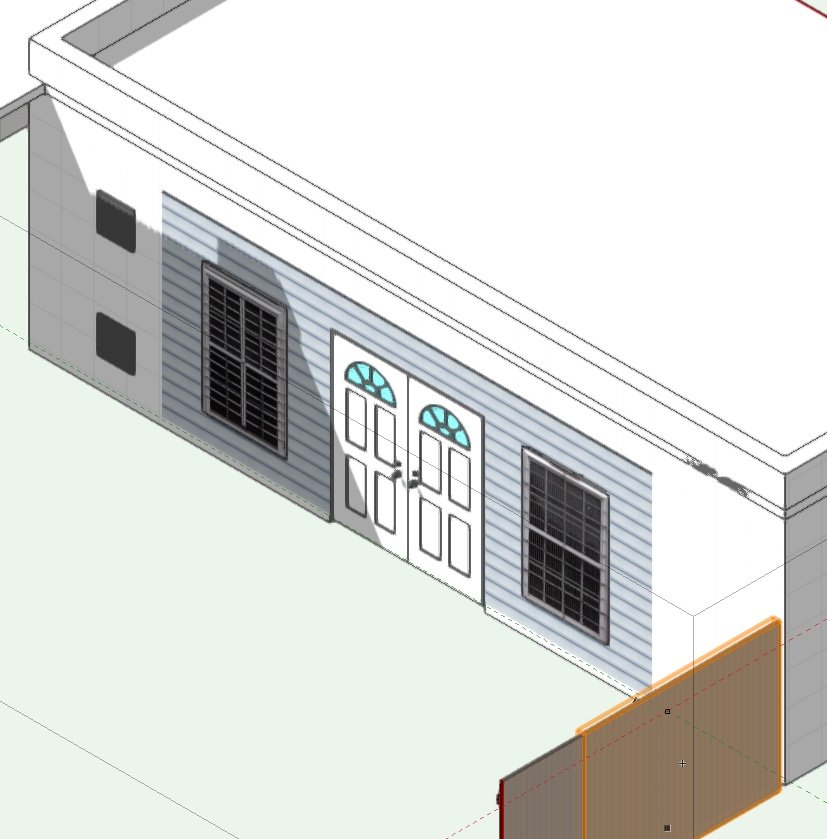
I ask for help with this .... in existing construction, there is a concrete block garage where the double garage door was removed and filled in with a 2x4 stud wall with a personnel door. I model the CMU wall with an opening, then insert a new wall that contains the door (and windows). However, when shown on plan view, the personnel door is not shown correctly because the CMU wall occupies the area where the door is. How do I make it show on top/plan correctly ? I attached two images to explain.
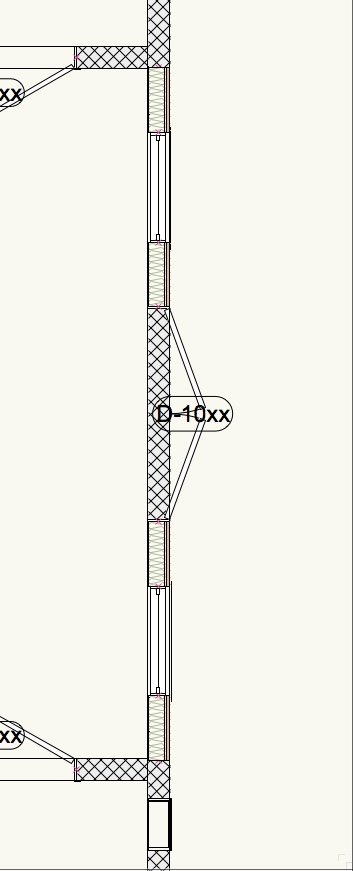
-
I am exceptionally embarrassed to say my last post was mis-information. (I didn't lie, because I believed what I said was true.). The project was the Major Hillard Library in Chesapeake VA, and if you look at a Google earth satellite photo, you'll see we actually built it using a built-up roof (asphalt and aggregate). My old (and defective) memory is now refreshed and I remember the Architect initially designed it with a metal roof, and there were too many detail problems, so we switched to an asphalt/aggregate roof. Even without the metal roof, there were other problems ... like the insulation and sheathing panels are not 3D curved, and building felt was oddly applied. At the same time, we were building another metal roof project that had problems (but the building wasn't curved). I am so sorry my old memory is bad.
Even though the building and the roof turned out good (no roof leak history) this project did turn me against curved buildings. When all your building pieces are straight and planar, it doesn't make a lot of sense to force them into 3D curves.
Curiously .... it was the only project I had where about 15 long span (35 ft) steel web truss joists were stolen. Someone with a crane and truck showed up on a Saturday and just outright stole them. Never did find them.
-
4
-
-
for what it is worth .... I was the construction manager on a Library that used this exact roof type and shape about 15 years ago. Each metal panel was the same width throughout it's length. The roof is segmented like Tom W showed. It was a memorable pain in the butt for everyone, and I ask all readers to avoid this design (or use a EPDM or TPO roof).
-
2
-
-
I thought you might want to know this odd (and un-officlal) response. I recently tested my old copy of VW 2010 on Mac OS High Sierra, and it seemed to work just fine (even though the compatibility chart said it won't work). Out of curiosity, I inquired about this to VW tech support and the surprising answer was that older versions of VW "might" work on newer versions of Mac OS even though the VW compatibility table says they will not work. The 'odd' answer included a comment that the older VW will only work on the newer MacOS if the old VW was already loaded on the computer before the MacOS was updated to the newer version. I find this very curious, and I can not explain it. Good Luck.
-
Help .. I'm baffled by this. I was just happily drawing a residential roof when I suddenly noticed the house would no longer render anything using Renderworks. I tried Custom, Fast and Final renderworks and got the same result each time .... the entire screen shows up solid white with nothing shown at all. Everything renders correctly using OpenGL. I checked all classes and layers for "on/off" and I quit VW then started it again with no fix. I noticed in the menu bar that the menu item for Renderworks (all types) is now greyed out and can not be selected.
What happened to me and how do I fix it ?
PS: I started a brand new empty file, put an extruded cube on it, then applied a texture. I get the same result. It shows fine in wireframe and OpenGL but nothing at all shows in any RW window.
-
let me re-phrase my last comment ..... I can download the premium file resources one at a time. They are clearly on my hard drive, inside the VW application folder under "libraries". However, the files do not show up inside the Resource Manager dialog box, inside the File Browser pane. Is there some way to 'load' the files into the resource manager ? I didn't have to load the normal VW resource files. It was part of the download process. The premium files seem to act differently.
-
thanks for the responses ..... it appears that I can not download the Premium Libraries. Is that my fault because I'm doing something wrong, or is it just set up that way ?
-
It appears that many resource libraries are not on my local hard drive, but are 'called up' from the internet when I select them. Is there a way to download every single resource file to my hard drive ? I've discovered how to download a single resource file, but I'd rather do them all at once.
Also .... if I were to cancel Service Select, would I then lose access to all these resources that are not downloaded on my hard drive ?
-
I just upgraded from VW2015 to VW 2023 and purchased Service Select, and I notice a huge increase in the available symbol resources. However, they seem to be downloaded from the internet when I use them, rather than residing in folders on my hard drive. So ... are these symbols and other resources only available to me because I have Service Select ? If I cancel Service Select but keep my perpetual license, will these resources still be available for download ? If they disappear with a Service Select cancelation, could I download them before Service Select ends in order to save them ?
-
also try my favorite, "Graphite" from the same Adobe website. It mimics the way some old Architects (like me) were taught to letter .... constantly rotating the pencil lead to get the right shape/stroke ... back when pencils and paper were used.
-
2
-
-
I am now happy to report the problem no longer exists in the same file after being exported to and opened with VW 2023. So thanks for the help ..... never mind.
-
thanks for the help ... I went down the list, and turned off every single class and could not find an offending class. I am working in VW 2015 but recently purchased VW 2023. For a bunch of reasons, I can't check it out in VW 2023 for a couple days but will transfer the file and see if the ghost lines still exist. Hopefully, they'll disappear. More to follow .....

Resource Manager easy help
in General Discussion
Posted
yes ... I was editing inside a symbol ..... and this problem has always been sporadic, so I'll look in the future to see if it always pops up when editing inside a symbol.