Jump to content

Search the Community

Showing results for tags 'maxon'.

  • Search By Tags

    Type tags separated by commas.
  • Search By Author

Content Type


Forums

  • Announcements
    • Announcements
    • News You Need
    • Job Board
  • Feedback
    • Roadmap
    • Wishlist - Feature and Content Requests
    • Known Issues
    • Wishes Granted / Issues Resolved
    • Forum Feedback
  • General
    • Troubleshooting
    • General Discussion
    • Architecture
    • Site Design
    • Entertainment
    • Previsualization
    • Braceworks
    • ConnectCAD
    • Energos
    • Rendering
    • Workflows
    • Buying and Selling Vectorworks Licenses
    • Hardware
  • Customization
    • AI Visualizer
    • Marionette
    • Vectorscript
    • Python Scripting
    • SDK
    • 3rd Party Services, Products and Events
    • Data Tags
  • Solids Modeling and 3D Printing
    • Subdivision
    • Solids Modeling
    • 3D Printing
  • Vectorworks in Action
  • Archive
    • Resource Sharing
    • Machine Design

Calendars

  • In-Person Training - North America
  • In-Person Training - UK
  • Coffee Breaks
  • Essentials Seminars
  • Webinars
  • Community Groups

Categories

  • Knowledgebase
    • Tech Bulletins
    • Troubleshooting
    • Workflows
    • How To
    • FAQs

Categories

  • Marionette - Objects
  • Marionette - Networks
  • Marionette - Nodes
  • Marionette - Menu Commands

Product Groups

There are no results to display.


Find results in...

Find results that contain...


Date Created

  • Start

    End


Last Updated

  • Start

    End


Filter by number of...

Joined

  • Start

    End


Group


Occupation


Homepage


Hobbies


Location


Skype

Found 3 results

  1. 2026-U4-Maxon-Redshift-for-Vectorworks-final.mp4 Some additional Resources: System Requirements Help Guide How to install the Maxon App (in brief) and set up Redshift for Vectorworks How to download & install the Maxon App How-to articles: How do I create a MyMaxon Account How to access a free trial How to Assign a license in Maxon App How to Uninstall Videos How to use the Maxon App Troubleshooting articles: -22015 error Status -1 error Sign in Failed Resolving Login & Loading Problems in the Maxon App Training Resources: Introduction to the Interface Core Features Go further with Cinema 4D Workflow and how-to questions about Redshift for Vectorworks are best asked in the official Redshift forums. If you need installation help, have a licensing issue, or have found a potential bug, Maxon’s support team is ready to help; just create a ticket via their Support Center.
  2. Maxon’s new Redshift for Vectorworks is transforming architectural visualization — with real‑time rendering that lets you bring drawings to life, build immersive scenes, and wow your clients. We’re nearing a major update: Animated video export Enhanced material control in our real‑time ray tracer As we get close to production‑ready, we need more beta testers to help shape the final product. Why join? Try upcoming features before release Influence development with your feedback Top testers can earn a free one‑year subscription from Maxon Sign up today and start creating visuals that inspire. Your input will help make Redshift for Vectorworks the best visualization tool possible. Sign Up Here
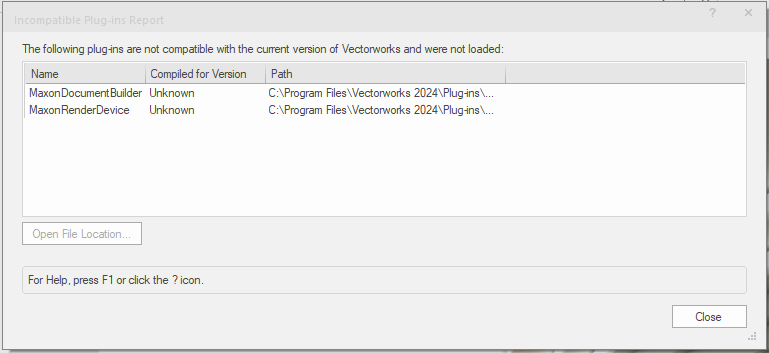
  3. I noticed that since I've installed Vectorworks 2024 on a fresh install of windows I get the following error when Vectorworks boot up... i need to close this error message before Vectroworks will open up... its annoying, I have no idea what it is [no reference to Maxon found in the KB when I looked...], or if its linked to my screen going black [I've asked for help with the other issue with in another post on the Vectorworks forum]. All help gratefully received!! Thank you!!
×
×
  • Create New...