Jump to content

Search the Community

Showing results for tags 'revit import'.

  • Search By Tags

    Type tags separated by commas.
  • Search By Author

Content Type


Forums

  • Announcements
    • Announcements
    • News You Need
    • Job Board
  • Feedback
    • Roadmap
    • Wishlist - Feature and Content Requests
    • Known Issues
    • Wishes Granted / Issues Resolved
    • Forum Feedback
  • General
    • Troubleshooting
    • General Discussion
    • Architecture
    • Site Design
    • Entertainment
    • Previsualization
    • Braceworks
    • ConnectCAD
    • Energos
    • Rendering
    • Workflows
    • Buying and Selling Vectorworks Licenses
    • Hardware
  • Customization
    • AI Visualizer
    • Marionette
    • Vectorscript
    • Python Scripting
    • SDK
    • 3rd Party Services, Products and Events
    • Data Tags
  • Solids Modeling and 3D Printing
    • Subdivision
    • Solids Modeling
    • 3D Printing
  • Vectorworks in Action
  • Archive
    • Resource Sharing
    • Machine Design

Calendars

  • In-Person Training - North America
  • In-Person Training - UK
  • Coffee Breaks
  • Essentials Seminars
  • Webinars
  • Community Groups

Categories

  • Knowledgebase
    • Tech Bulletins
    • Troubleshooting
    • Workflows
    • How To
    • FAQs

Categories

  • Marionette - Objects
  • Marionette - Networks
  • Marionette - Nodes
  • Marionette - Menu Commands

Product Groups

There are no results to display.


Find results in...

Find results that contain...


Date Created

  • Start

    End


Last Updated

  • Start

    End


Filter by number of...

Joined

  • Start

    End


Group


Occupation


Homepage


Hobbies


Location


Skype

Found 4 results

  1. I have inherited a Revit file. I imported it to Vectorworks. Lots of cleanup to do, but I'm surprised how well it actually worked. Imported windows became vwx window objects, which is great. However, I can't seem to get them to show up with any texture. Not sure if this is because they came from revit, or if I'm missing some setting. I can't get any shading/fill/texture to appear in any of these windows. I tried creating a window style, and I also tried changing attributes for unstyled windows. Did all of the things I normally do to show texture in window components such as trim, but they still appear wireframe. What am I missing? Walnut Revit Import.vwx
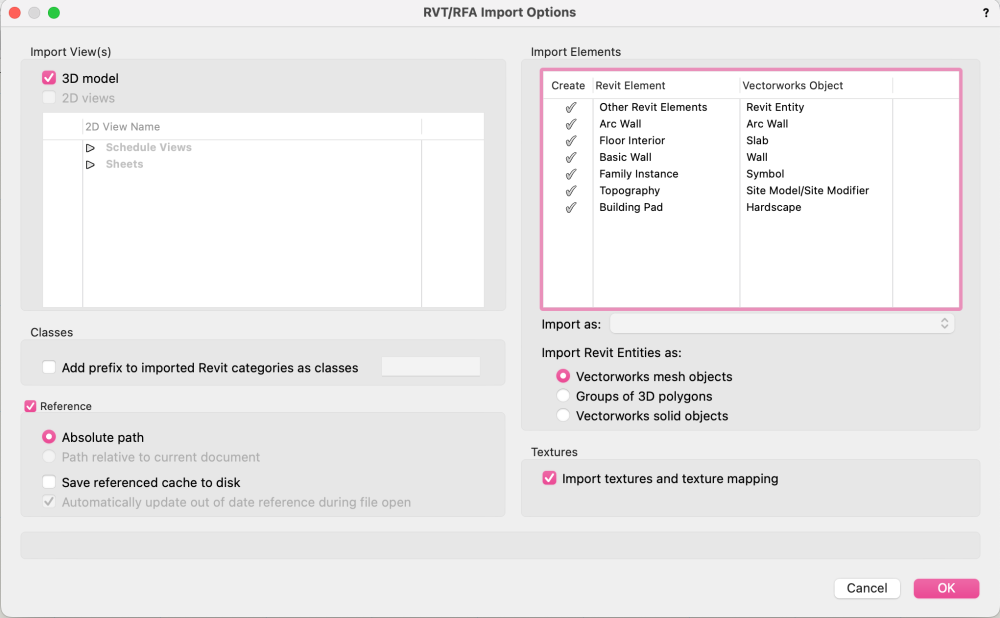
  2. Any issues with importing Revit files? I've tried both importing directly and importing as a reference, and each time the import (progress bar) just crashes my entire machine, so I need to manually pull the plug and restart. Not sure if I'm missing a trick with the import options, (settings below) or if it's my processing power, or the revit file itself? (54.7MB) I have a BIM workshop with the rest of the design team this afternoon, and it's not a great start that I can't open their file! 🙈 Any quick fix tips would much appreciated @Katarina Ollikainen@Tamsin Slatter ??
  3. Just tried to convert a whole Revit project file. Did not come out as expected. Anybody else try this? Any tips? Thanks, Rudy Beuc
  4. We are long time users of Vectorworks within the architectural sector. We consult to larger firms and provide designs and equipment layouts for institutional projects. More and more our clients have been asking about our compatibility with Revit. We have always worked in 2D and are exploring the jump into 3D/BIM to be more marketable to the architectural offices we work with. I'm looking for feedback on others' experience in working with and the workflow from Vectorworks IFC and Revit. Thinking back to the days of DXF files being imported from and to AutoCAD, it was almost a bigger issue for our partners to bring in our files than it was worth. Has it been the experience of those working between IFC and Revit that the import/export process creates more trouble than its worth? Any input would be greatly appreciated.

×
×
  • Create New...