



C. Andrew Dunning
-
Posts
1,153 -
Joined










-
Delving into this...another question: In calculating Pipe-and-Drape panel counts, the tool "sees" each upright-to-upright segment independently. So...on the "horseshoe" pipe-and-drape run, each upright-to-upright segment that is equal-to or less-than the stock drape width "gets" a panel. So, using your 4m example, "11" is correct..."Working As-Designed." IF, though, you are wanting to (essentially) ignore the uprights, the overall run length is 31.78m and the panel count would be 8. Is THIS what you're wanting? This is a very different animal. The overlap graphic display issue I mentioned is not W.A.D... 😞 I also sent you a DM..
-
Nothing has changed in this part of the code recently. My suspicion is 1 or more things are at-play, here: The panel count routine measures the actual distance between uprights (not center-to-center). So, the OIP might show a spacing of 3m that is actually 2.99m. The panel count routine doesn't allow for any sort of "precision allowance" that arguably should/could be factored in, considering the nature of dealing w. fabric. There might be an inconsistency between the panel count routine and that that draws the break markers. Some simple error-trapping needs to be relaxed a bit. Any way, like I said in my response to your initial post, addressing this is definitely on the "To Be Addressed"/"Gotta Fix" list. You are not being ignored or brushed off; delving into this will simply take some time.
-
This might help: CreateText (TxtStr1); (Creates block of text) TxtHndTmp := LNewObj; (Assigns the block of text to a handle) SetTextWrap (TxtHndTmp,true); (Tells the text block to wrap) SetTextWidth (TxtHndTmp, PBlkWdth); (Tells the block of text how wide it is to be)
-
There isn't an automatic way to do this. You'll have to build your truss structure and use a television casing Symbol that includes a mounting bracket.
-
@benghiat's Projection Viz allows for this. https://benghiatlighting.com/software/product/projectionviz-1/#description
-
Using the "horse-shoe" shaped instance as a reference, there are 2 things going on in your file: The longest distance between the verticals is 2.95m (measured from inside of vertical to inside of vertical) or 2.99m (measured from vertical centers). So, as your stock drape width is more than that, the count of 11 is correct. While there is not overlap, the overlap graphics are still being created on the long sides. That part is not correct. I confirmed the same issue in both the Spotlight and the Landru version of the tool. Now on the "Gotta Fix" list...
-
Stage steps will not allow a height taller than 2ft.
C. Andrew Dunning replied to Scrappy_Bogart's topic in Entertainment
A maximum single-step rise of 2' and a minimum single-step rise of 2" are hard-coded into the tool. -
George - See attached. The Landru Design version of the tool includes code to allow for efficient use of UST Projector Symbols (and, a few sample Symbols). It also includes a "Floor" "Vertical Position." UST Demo.vwx
-
Add my own image to a projection screen
C. Andrew Dunning replied to Tyrrellian's topic in Entertainment
In your VW file, create an Image-Based Texture. Select the Video Screen object. Click the "Edit Screen Image..." button in the OIP. In the picker in the upper left-hand corner of the dialig that opens, select the Texture you just created. Click OK. -
Same, here.
-
Attached is a gear count Worksheet I use. While it is looking for the Landru Design versions of the tools, it might be helpful in this conversation. Note the Script that the SoftGoods portion uses. LandruCountDemo.vwx
-
Speaker Array - Rigging Frames & Pull-Back Bar
C. Andrew Dunning replied to Mark Aceto's topic in Entertainment
Good question! The best answer I can give is "maybe." It really depends on user demand and what Vectorworks chooses to license. -
It is now... See http://www.landrudesign.com/VWPlugIns.htm for more info.
-
Speaker Array - Rigging Frames & Pull-Back Bar
C. Andrew Dunning replied to Mark Aceto's topic in Entertainment
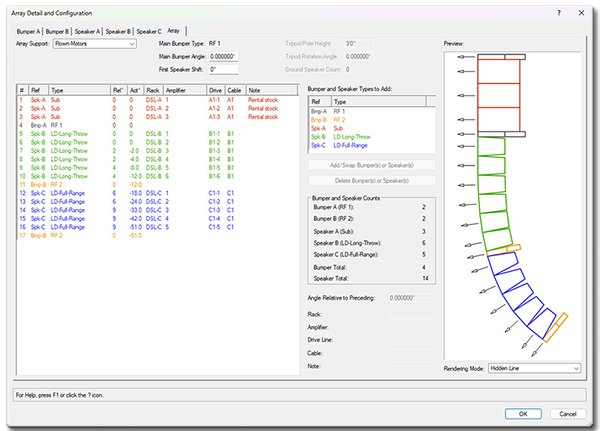
For those of you still following this thread, we just released updates for all of our tools. As part of that, AudioArray 2 now supports multiple bumper types: If you're interested, see http://www.landrudesign.com/VWPlugIns.htm for more info.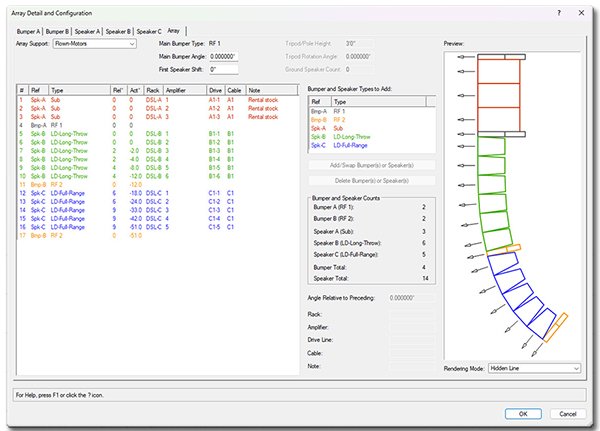
- 23 replies
-
- 2
-

-

-
- speaker
- speaker array
- (and 1 more)
-
Convert pipe and drape to stanchions
C. Andrew Dunning replied to Josh_M_Gill's topic in Entertainment
No. When developing Stanchion Layout I toyed w. such an idea. The tools "think" differently enough that I scrapped that thinking early-on. Not a bad question, though...