Scott Lebsack
-
Posts
80 -
Joined
-
Last visited
3 Followers
.thumb.jpeg.48a6fdc44e48c98b8e1b507e86e57e95.jpeg)

-

Expand the use of the 3D Dragger
Scott Lebsack replied to MGuilfoile's question in Wishlist - Feature and Content Requests
2024.0.4.1 is available, in case that addresses the issues you were having. -
Expand the use of the 3D Dragger
Scott Lebsack replied to MGuilfoile's question in Wishlist - Feature and Content Requests
I think what you're asking for is possible. When the selection tool is active, switch to transform mode. This is available using 2024.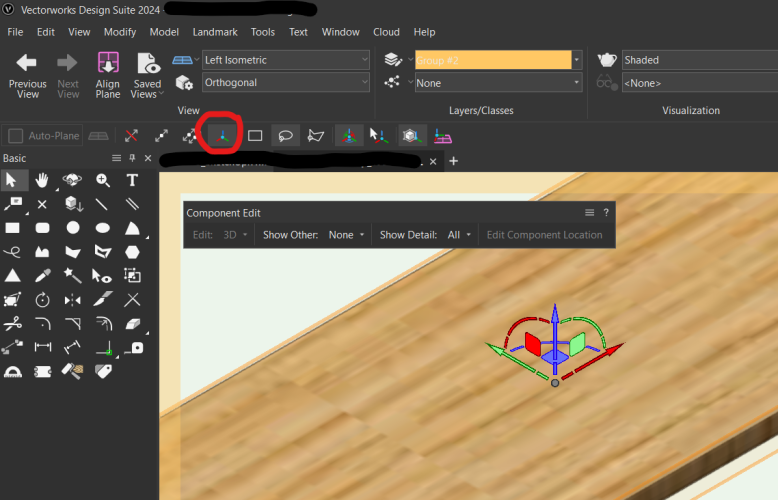
-
Modifying Bulk Stake Objects
Scott Lebsack replied to AKieran's question in Wishlist - Feature and Content Requests
If the scripts don't work... You could create a worksheet with the data necessary (match a surveyor's point file) export the data to excel and use a formula in excel to multiply your values, then re-import (Landmark>Survey Input>Import Survey File...)? I'm sorry this is only the basics of a workflow, but it might be somewhere to start? Alternately you can use the Modify>move>Move 3D to move stakes with the same value a given amount. You would need to isolate them in vertical bands for selection to make this work and it could be tedious, but it's something? -
@Vito89 I asked a few folks. This is a know bug that was identified during our development process. Our Engineers have submitted a fix for Update 1, currently scheduled for release in October.
-
Customizing the Filemaker Vectorworks Plant Database
Scott Lebsack replied to reGenerate Design's topic in General Discussion
@reGenerate Design @Katarina Ollikainen and other users may have more insights about the plant database, there are many that use it extensively. My understanding is that Vectorworks will be moving away from the FileMaker Database, as it is no longer supported in the manner it was implemented. As a practicing Landscape Architect, my needs were likely different from yours, but I used Plant styles to hold my data. With Plant Styles it was easy to duplicate and tweak plants precisely for a project. I would then store all my Plant Styles in a single file where I could access them to add to new projects. In addition to the Plant Styles, you can create custom worksheets to pull data from plants in a file and layout the data in a spreadsheet like format. One additional resource you may look at is adding custom records for data that doesn't have a "place" in the Plant Styles. You can pull this same record data into your custom worksheets alongside the data stored in the Plant Styles. Custom record formats are fairly easy to work with and should provide a lot of flexibility for adding data to plant styles. I hope this is helpful? Have a good afternoon. -
Suspend Irrigation Network Update
Scott Lebsack replied to Dave Phelps's question in Wishlist - Feature and Content Requests
There is an ability to suspend irrigation auto calculations in Vectorworks Landmark 2023 SP4 and newer releases. In the Landmark Menu>Irrigation>Irrigation settings got to Options tab and uncheck "Auto calculate the network" You'll need to re-enable this in order to get accurate calculations.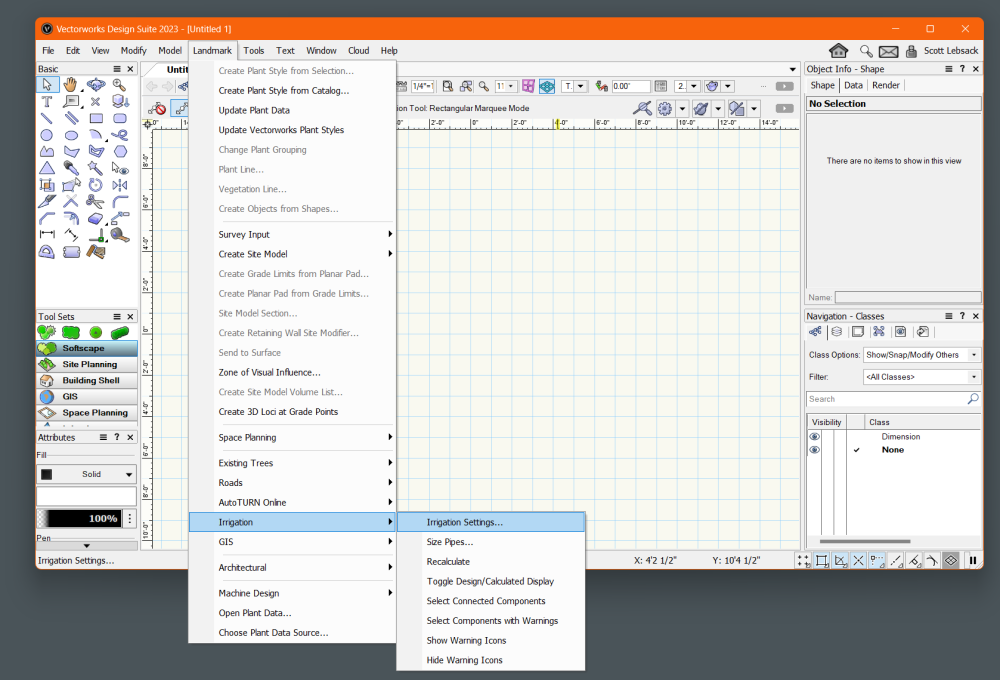
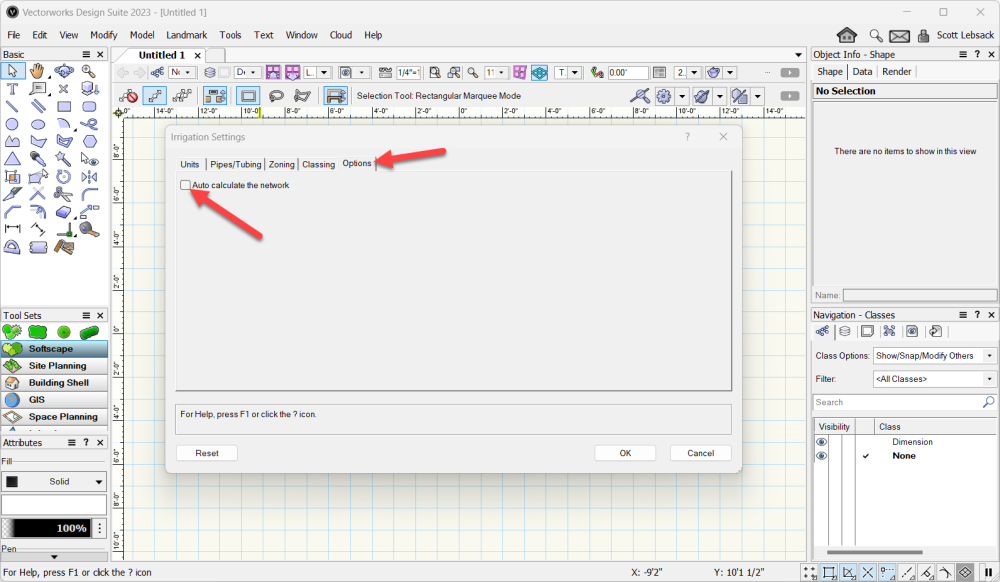
-
Trim tool in 3D...
Scott Lebsack replied to shorter's question in Wishlist - Feature and Content Requests
@shorter does the split tool not accomplish what you're after, or do you have an idea to change it in some way? -
@Tom Klaber it requires some math ahead of time, but edit>duplicate along path might get you most of the way there? Select a path and select a symbol or other object you want to duplicate along the path invoke the command...
-
Symbol list accessories
Scott Lebsack replied to SimA's question in Wishlist - Feature and Content Requests
I don't know about any of the rest of it, but you can get a list of symbols in your file through Tools>Utilities>List Symbols... -
@Amanda McDermott I answered on the other thread, but Hardscapes always have a 2D and 3D(if selected) representation, they should not be auto hybrids?
-
@Amanda McDermott unless I'm missing something, using the Hardscape Tool (or creating Hardscapes from shapes) should not require a hybrid object? Hardscapes automatically have a 2D and a 3D representation. If you're doing simple extrudes or some other form of 3D for your "Hardscapes" this will not be the case...
-
Plant tag leader lines
Scott Lebsack replied to Beth H's question in Wishlist - Feature and Content Requests
@Beth H I would strongly recommend data tags. They are a game changer, they will require a little bit of getting used to, but I've never heard of anybody going back to plant tags after they know about, and how to use data tags. Here's a quick video from when they were first introduced. Good Luck -
@Mike Lamb approach is good, if you're looking for something that needs a little more precision for construction, similar to image two. If you're using the site model, I would look at using Nurbs curves on the "Site-DTM-Modifier" class to define the top edges of the track, bottom of the track, where it ties back to grade is your grade limits. You could also add an occasional nurbs perpendicular to the track on the same layer to provide variation - dips and rises between your two top track edges. This would result in a grading plan you could hand off for construction.
-
Scott Lebsack changed their profile photo
-
@line-weight Brilliant observation, I long considered this an issue, but hadn't applied the "style" metaphor, but this absolutely makes sense. I was always hung up on wanting to set a style without locking down the alignment, or creating too many with each alignment covered. I'd thought about InDesign font familes, but it all seemed too complex, your approach is quite elegant.
-
@BJRobinson to be more precise, I wouldn't invest any time in the built-in catalog or database. Plant styles are easy to use (and reuse) resources, that are able to contain a complete list of data for your plants. Once you have the data in the Plant Style for each plant, catalog data becomes redundant - as long as your plant style resources are easy to find and reuse. The data contained in Plant Styles is also available to worksheets in Vectorworks without additional work.