


TSG-Sim
-
Posts
27 -
Joined
-
Last visited
Content Type
Profiles
Forums
Events
Articles
Marionette
Store
Posts posted by TSG-Sim
-
-
totally agree @line-weight if it could have an intelligent autobox mapping so you can just align to a direction on all faces and it automatically maps planar but in the direction you choose in the UV box.
-
When using renderworks textures and you apply the texture (for example a plywood edge on a desktop) to a multiple filleted shape.
What is the best way to get a texture UV wrapped correctly so all the faces are the correct way up and aligned correctly, when I need a texture just on the edges of a shape not the top and bottom, how do I get it to align all the way around without manually mapping each one. I have included a file that shows the rotation of the UV. In some other programs I can use UV unwrapping or other UV methods to make the texture align correctly but I can't seem to do this quickly within vectorworks within picking every face individually and rotating them.Any help would be greatly appreciated.
Kind regards,
Simeon
-
When using renderworks textures and you apply the texture (for example a plywood edge on a desktop) to a multiple filleted shape, what is the best way to get the texture UV wrapped correctly so all the faces are the correct way up and aligned correctly, when I need a texture just on the edges of a shape not the top and bottom, how do I get it to align all the way around without manually mapping each one. I have included a file that shows the rotation of the UV. In some other programs I can use UV unwrapping or other UV methods to make the texture align correctly but I can't seem to do this quickly within vectorworks.
Any help would be greatly appreciated.
Kind regards,
Simeon
-
Does anybody know how to script the sheets and viewports so that it can loop through all my design layers in a file and generate for example 8 viewports we need per item and an overview but with the codes for each item displayed on the overview.
we have hundreds of viewports to create and I have looked into partially scripting this but I wasn't understanding fully how the viewports worked with the design layers to get each item and how we could maybe use either cameras or a fixed viewport to define the view properties for all other viewports.
For example we have 10 design layers, on each design layer is a symbol titled as the code of the product and the design layer is named the same code. They are all centred in the middle of the origin in the same place for each item, we need for each design layer, 1 sheet layer that will show the plan view and all 8 custom view / camera view rotations all around the item, think turntable. After this overview sheet we will have the 8 separate rotations all as separate sheets but we might have to repeat this for 1000's of items and on each overview page we need text that displays what the symbol name is.
I would highly appreciate any help with this.
Thank you,
Sim
On 1/26/2023 at 4:59 PM, Pat Stanford said:Assuming this is actually a 3D object the only way I can think of is to create a design layer for each object with the object in the same location on each layer. You then create the first Sheet Layer and layout the Viewports the way you want with appropriate layer (Only one Design Layer active) and class setting and view and rendermode for each viewport.
Duplicate the Sheet Layer, Go to the new sheet Layer, select all the Viewports. Click the Layers... button and change the visibility so that the "next" Design Layer is the only one visible. When you update the viewports you should have the second object. Repeat for all the other layers.
This is scriptable, but I don't have time right now (next two weeks) to work on it. 😞
-
Hi @line-weight thanks that almost works fully but with the amount of sheets and hidden line geometry it may get very slow and may even stop but I need to check the main file, I haven't had chance to try it with all the items I had so I might when I get chance with all 300 items (I managed to complete the project over the weekend that I was doing, creating them partially manually each page using a graphics legend for the 300 separately) but I just tried your method with 14 random items from vectorworks library and it seems like you can use this way to create them.
It looks like you can use your way and get rid of the margin which is a way of creating the titleblocks side by side and it creates one PDF with all the pages in which does work and if I wanted individual images I can create individual images like that but the only downside to this method is that there is no automatic method of naming the pages like sheets and no way of exporting as individual PDF pages so only one per PDF.
It is almost there but definitely if the graphic legend had an output to separate sheets or even a publish like window for generating separate sheets that would be perfect so you could just create one template page and output lots of sheets from that with whatever filters you have, speeding up multiple page creation.
I think vectorworks is definitely improving with each release, just needs some streamlining to things like this and certain user interface tweaks,
I could see some vectorworks improvements as:
1. have something like the graphics legend that is similar to affinity publisher or indesign master pages so you can create one page and all other pages you assign the master too automatically uses that master for creating views from and automatically publishes from a filter setup a bit similar to publish pages but with this graphics legend built in.
2. maybe something like a hybrid stretching 2D and 3D symbol that has an offset and the offset allows all items outside the offset to be fixed and everything on the inner of the symbol stretches, I know we have marionette but if we had a dynamic stretching style block we wouldn't need to take ages setting up marionettes for some things.
3. in addition to the above hybrid stretching symbol have a pulldown option that is configurable by the user so you can hide and show things in a symbol and assign the hide and show to a dropdown item, you could assign any 2D or 3D item to the dropdown and it just hide or show depending on what option is picked. I know autocad has dynamic blocks like this but they were limited but if vectorworks allowed hybrid stretching and hybrid visibilities and it automatically creates a plugin symbol it would be very useful.
4. making startup times a lot quicker (maybe removing plugins from startup until you run the tool for the first time and then after that first run each plugin runs quicker because you started it already from the tool, it would speed up startup a lot I think. It might slow down the tool a little for the first use but I could see a lot of speed increase in that as each user doesn't use every tool / plugin inside of vectorworks and if you use the plugin / tool you are more than likely to use it more than once in the session your running. I might be wrong with my thinking on this though.
5. Worksheets update the user interface to be more like apple numbers like style filters / categories and build in better formatting for cells, maybe improve and put in auto dimensioning into worksheets as well (it may be that graphics legends could be the replacement for this but its not advanced enough yet, but certainly getting there.
Thanks for your help with this graphics legend.
Sim
-
Having a look into Graphic legends myself my understanding and I might be wrong though:
if you had multiple extrudes the only thing you can do with them for listing off into a graphics legend is display what foreground or background fill or any of the image attributes or pen display or properties of the extrude there isn't a way I can see of listing extrusion lengths off unless you create them as hybrid symbols.
The pulldown you posted @line-weight you might already know this but you are correct it has to fit one of those object modes apart from if you choose legend type object attributes instead of object, if you pick object attributes you can list materials, textures, fill colours and everything else related to image / appearance.
The object list above I can see working is as follows:
1. Hybrid Object = 2D/3D Symbol Hybrid just means the 2D/3D Symbol could be a door, window, furniture item anything that is a symbol or some built in items (best to test a single item by filtering it to one item first but very handy for displaying most items)
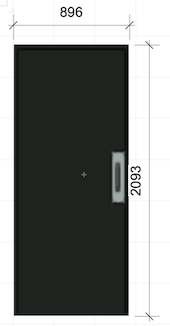
2. Vertical wall = as described any vertical wall takeoff that you would want from any of the walls in your file it is created to show vertically up and down the page as image below
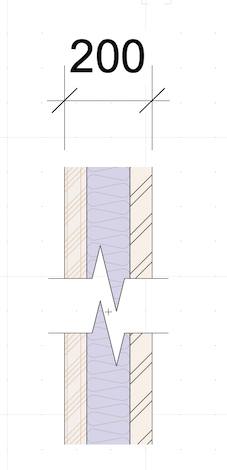
3. Component can be a wall item by component or anything that is component based that you can break down, handy for dimensioning wall parts (others may know additional uses for this)
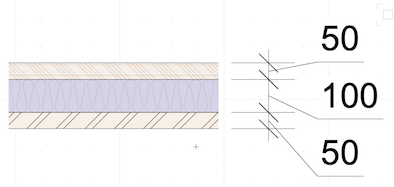
hardscape is as it says and planting is any plant from the database you can list from basically an image of a plant and descriptions etc you can put into a legend.
I only use graphic legends for furniture items but I am seeing how it can be quite handy.
they are very powerful but need a little more work and they would be perfect.
-
 1
1
-
-
The thing I would really love and put it above anything else for the graphic legend as a feature is splitting up across pages as that as a feature would have saved me 3-4 days of work creating 300 sheets manually.
I think the graphics legend is very powerful what you can do with it and hope its pushed for future releases and will help us do so much more with sheets.
I am thinking graphics legend is like master pages in indesign or affinity publisher where you can change one and it changes hundreds of pages. even if the updates for the pages take over night to process it is still one night compared with days for hundreds of items.
-
2
-
-
Hopefully the file attaches with this.
-
Hi,
Example file attached, apologies the file is a little large I took the original and stripped it so it was easier for me to send you the example.
I hope I have made sense with what I am trying to do and I don't even know if this is a good way of doing this but it seems to work for me at the moment. Just the wait time in-between updating the views I have to cope with.
I am very grateful for you coming back to me on this as I say we do this kind of thing a lot.
I would like to have the views looking a little better than they do as well with the dimensions and positions but I ran out of time and I was trying to keep everything at 1:100 so it was easy for anybody to take dimensions from it with any ruler and I just had to get these done for now but for future work this would be really handy to have a quicker way of doing these kind of views.
Thank you,
Sim
-
Hi, Thanks for replying back that was my first thought, but instead of selecting multiple views on a sheet layer what I have done is created one graphics legend filtered to the specific Hybrid 2D/3D symbol I need with a few filters and that 1 graphics legend has all the views setup in it with the text and everything else from records that are set on the symbol, so when I duplicate my sheet layer all I need to do is change the filter in the graphics legend and it updates everything else including text etc. ( I can extract a sample page if you want so I can show you my legend.)
the only thing I couldn't do was script the graphics legend to create all the sheets in one go automatically filtering each symbol and placing that new graphic legend that was filtered on individual sheets.
It would be very useful going forward even if it's not straight away but something that could automate doing this task whether it is with viewports or graphics legends as we usually have to do this a lot with different projects. I have tried scripting some things but I would be very grateful even if it's just some hints for the future on how to script this or if Vectorworks themselves could add something that could automate large tasks like this.
Marionette is amazing and I have managed to use some of it on some project and vectorscript / python is amazing to have but a lot of the time, a lot of users don't have time to spend on scripting due to project deadlines (which I know is very backwards for companies as scripting something could speed things up considerably) but it would be nice to have some way to automate sheet creation from either graphic legends or from a template page a little like a master page in indesign or something like that and then you could just set your vectorworks filters up on a template page and leave it running over night and come back to everything that would take days to do all within one night.
I would be very grateful when you do get time if possible just some hints on how to do this in the future or how to script just that sheet creation from symbols.
Thank you,
Sim
-
Thanks to the vectorworks team this is all now possible in vectorworks 👍 class and layer filtering
-
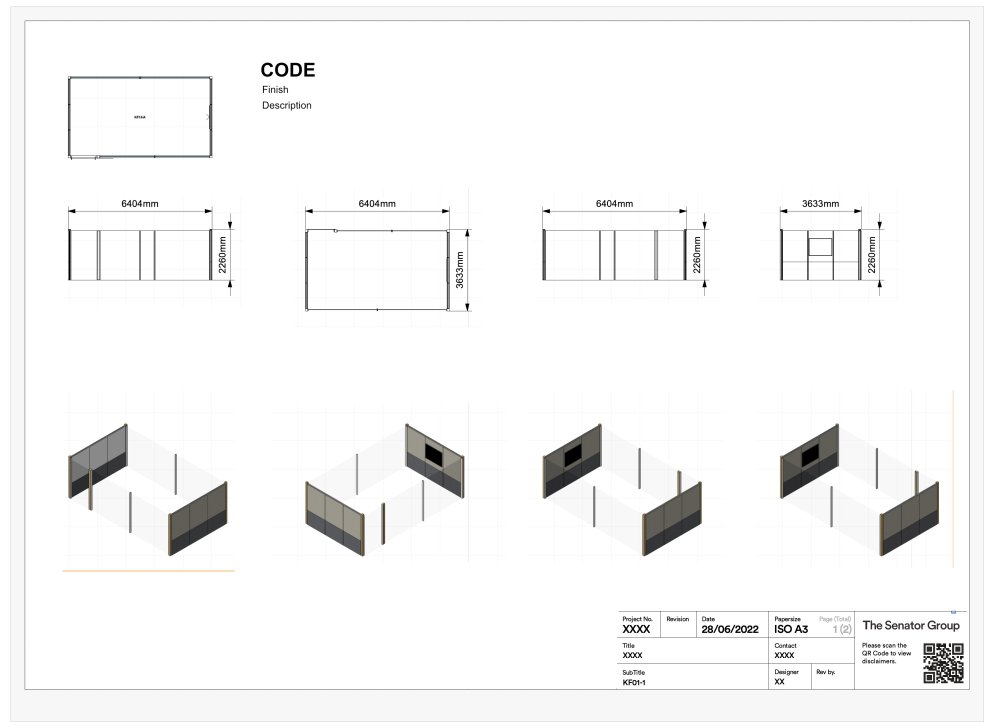
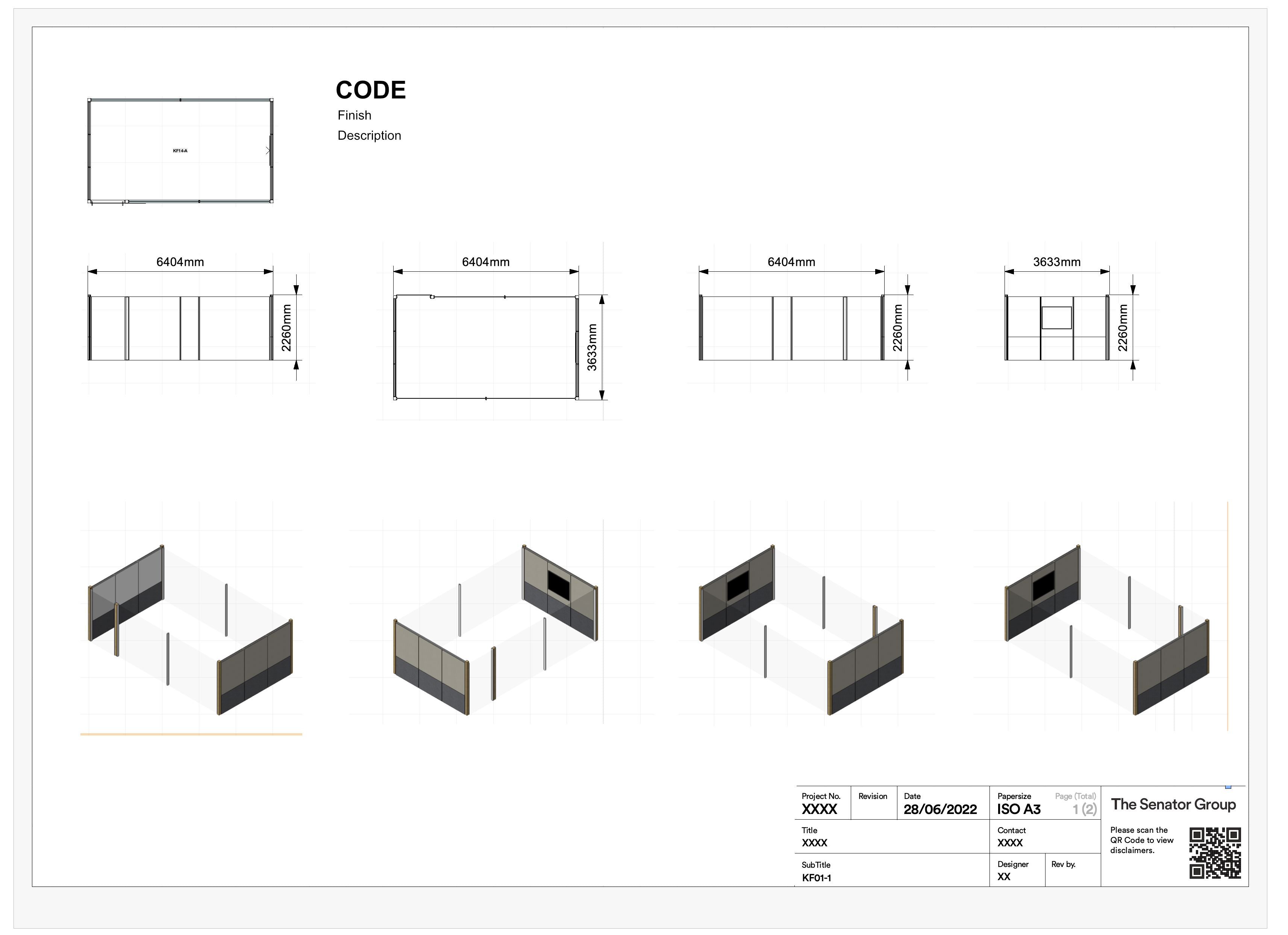
Does anybody know a way I can automatically create something like the attached sheet for a lot of sheets from lots of symbols (I have edited this to remove client information). I have 300 symbols and need to create a sheet like this for every one and place on a separate sheet is there a way to do this with scripts or the built in tools?
Currently I thought Vectorworks graphic legend could help me but I will have to filter each sheet individually for the item.
I would be grateful for any help that would speed this up please.
Thank you,
Simeon
-
What I have found is when you use vectorworks favourites it has a delay when it looks through all the symbols but now instead of using that method to hold any of our symbols, styles or anything. what we did was create a shared workgroup folder on our server that was a copy of the local vectorworks library then placed our custom symbols into the folders within the symbols and styles and anywhere else we needed templates or anything then add the folder the workgroup library from within vectorworks preferences workgroup and project folders and this made the whole process of using the symbols a lot quicker for both replacing symbols and for placing them in from the library. I use no favourites at all now and it seems a lot quicker this way. havent tested favourites in 2023 but I am still using workgroup and is a lot quicker in all releases, especially if you have a large library.
-
3
-
-
this is a feature request that I have seen quite a few new users do when learning and using vectorworks, so this would help them but would also speed up initial 3D views for all users, in 3D camera views, perspective views and all isometric views have an option to automatically hide the dimensions layer in 3D Viewports, so that the dimensions class only displays in top / plan, top, front, right, bottom, back and left views in any viewport.
even though it is only a few clicks to turn off the dimensions this one tick box in preferences would save hundreds of clicks throughout a year of using vectorworks.
-
I would love if publish had the option added to it so I could batch publish EPS as per the export EPSf option, at the moment I have to export one at a time.
-
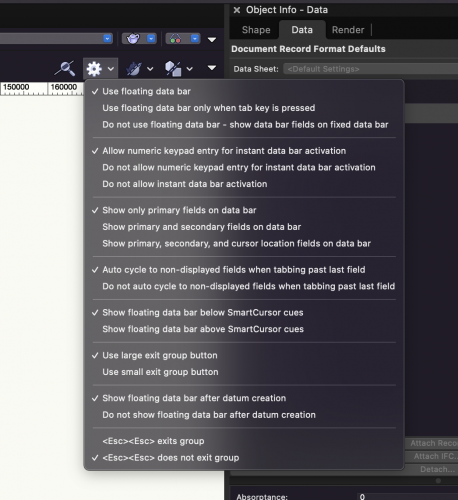
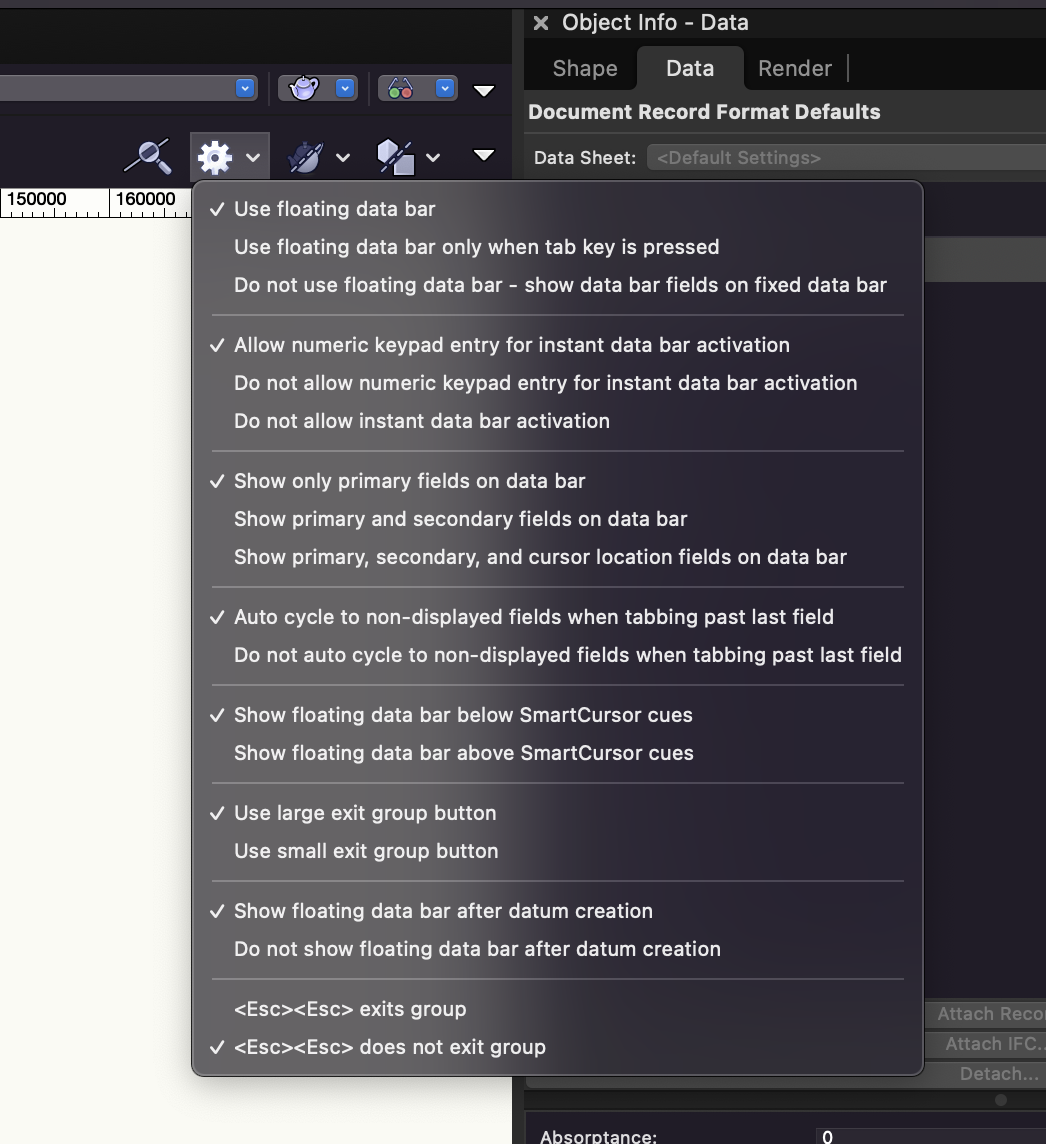
For any new user wanting the number keypad to type instantly into the length field you can set the option under the little gear icon top right of vectorworks and check allow numeric keypad entry for instant data bar activation, this is one of the first things I had to find to speed things up. This helps by allowing you to type straight into the first data field with the numeric keypad so you can draw quicker, Click the line tool for example select start point, type in length in numerical keypad and then choose your angle, then click to end.
-
2
-
-
Does anybody know whether there is a way on import of AutoCAD files to turn off all hatches and fills so that you only get linework without any fills as I have a lot of files that need cleaning up but I have to manually delete all the hatch patterns.
Thank you,
-
Hi Jim
Brilliant information in this feed for understanding what Vectorworks takes use of from the machine, will Vectorworks be ever able to use things more along the lines of a combined hybrid CPU and GPU for processing even basic things to speed up the process or have you ever thought about using specific things on each platform like Metal 2 (probably be Metal 3 before long) on Mac OS to speed up Vectorworks using direct access to GPU (take a look at affinity designer and affinity photo they are brilliant apps designed using Metal to speed up certain processes with live previews throughout) Overall Vectorworks is fantastic and I don't think I know many other packages that can work with a 10 floor building as easy but I just feel sometimes that Vectorworks needs that bit of a speed increase when working on large projects.
Thank you,
-
I agree filtering is really important in classes I think anywhere there is a dialogue you need to find in a list like the classes dialogue you should have a filter line at the top to search through all classes, layers stories etc so that it speeds up finding
-
A couple of wish list item that I would love is to do with marionette I will break down into 3 parts as follows but all 3 are connected into choosing, moving and stretching an item easier:
-
a new connection marionette that links this new node up to an item/object (Polygon, Group, Symbol etc)
Rather than having to name the item and place a name marionette to save time you should be able to connect the marionette node directly to the polygon so you could have it so you can just drag a special node handle over an item it highlights the item and whatever it is then is connected to the node and have the node name the item automatically or have a manual type in box to override the auto name to simplify users connecting Geometry of any kind to Marionette so you can visually see what you are connecting.
-
a marionette that will allow you to stretch the named item (from part 1) using bounding boxes
have this new node so that when you feed an object connection in it detects the item and then using a bounding box approach like@DomCapproach to stretching an item or something similar to that, where you specify two or more boxes whether they be 2D or 3D and a dimension input on the dialogue with a direction input to choose which orientation to stretch in either or all (X, Y or Z) so you can stretch the item easily in all or just 2 directions (example: you could use this to stretch say the ends of a desk with legs say in X: 200mm increments and at the same time stretch the depth of the desk between 600mm and 800mm depths without having tons of nodes to do this)
-
a marionette object that will allow you to lock / move instead of stretching the item (from part 2)
On the back of the above have a third marionette that has an input object and a stretch input object and you can pick either X, Y or Z like above but when the above marionette stretches the item this locks the dimensions of the input object so it cannot change dimensions have either a bound box again or named input.
I think the above would speed using marionette massively so you can reduce a massive structure of marionettes down to 3 marionette items/nodes.
I might be wrong but this is just an idea for speeding up workflow in marionette.
-
a new connection marionette that links this new node up to an item/object (Polygon, Group, Symbol etc)
-
Perfect thank you. @DomC this highlights how easily to adjust any 2D very quickly with Marionette.
-
I would love in Vectorworks if the Duplicate Circular Array had a new radio button to the left of angle between duplicates and a radio button, text box and button under angle between duplicates to divide items into angle. So instead of setting the angle between duplicates the text box and button divide the number of duplicates into the total angle e.g. Array these 8 items around 360º to get an angle of 45º between duplicates.
I am aware of that you can type in the total angle divided by number in the angle between duplicates box but it would save multiple steps every time I go to duplicate array because I could just leave it on the divide by 360 which is most of what I use duplicate array for.
-
I would have thought so as well it looks like when you have a scaling issue between layers with marionette on and then have to resize them, I was asking about the wrapping to know whether that would fix it.
-
On 15/09/2016 at 9:57 PM, DomC said:
1st_play_with_slider.zip
@DomCdo you still have this file available or something similar I am interested in getting a workstation to resize in width and depth. Thank you.
Vectorworks Graphic Legend - automation / separate sheets
in General Discussion
Posted
hi pat sorry I didn't get back from 2023 I had sorted a way of doing everything I needed using graphic legends in the end I managed to create my own workflow for it and got graphic legends working how I want and now saves me a lot of time manually creating sheets for everything by putting all the sheets onto one document page so I have x number of sheets on one page. thank you for getting back to me though and sorry for the delay its been pretty hectic here.